


Many companies start with AI the same way: someone signs up for a tool, a few people try it, and a few weeks later nobody is sure whether it is helping. There is no plan, no owner, and no way to tell success from noise.
A roadmap fixes that. This guide gives you a practical 90-day plan for adopting AI in any company, from choosing the first use case to training your team and deciding what to scale. It works for a five-person startup and a larger business alike. Only the pace and the number of people involved change.
This post is part of our AI for business series. For the big picture, read our pillar guide: Droven.io AI for Business: What It Is and How to Use AI in Your Company (https://bytebenz.com/droven-io-ai-for-business/).
Why You Need a Roadmap
AI adoption is not just a technology project. It changes how people work, which data is shared, and how decisions are made. Without a plan, common problems appear:
- Tools are bought but not used
- Different teams pick overlapping tools
- Sensitive data ends up in unapproved services
- Results cannot be measured, so the project loses support
- Employees feel anxious because nobody explained the goal
A roadmap gives you focus, accountability, and a clear way to learn quickly while keeping risk low.
Before Day 1: Get Ready
Spend a few days on these basics before the clock starts.
Name an Owner
Someone must be responsible. In a small company this may be the founder or an operations lead. In a larger one, form a small group with members from operations, IT or security, and a business team. Keep it small so decisions are fast.
Set a Simple Goal
State what success looks like in plain words. For example: “Save 15 hours a week on support and reporting by the end of 90 days, with no drop in customer satisfaction.” One or two goals are enough.
Set a Small Budget and Time Limit
Decide how much money and staff time you can spend. A small, fixed budget keeps the experiment safe and makes results easier to judge.
Be Honest With Your Team
Tell employees what you are doing and why. Explain that the aim is to remove repetitive work, and invite their ideas. People who understand the purpose are far more likely to use new tools well.
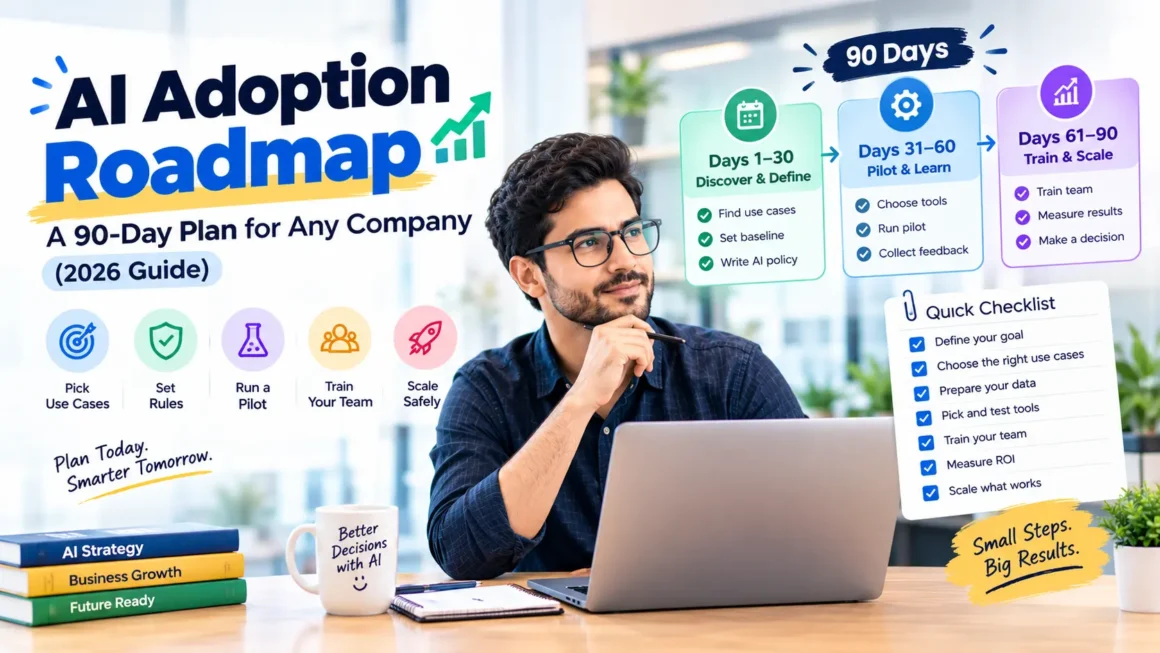
Days 1 to 30: Discover and Define
The first month is about choosing wisely, not buying tools.
Week 1: Collect Ideas
Ask each team where time is lost. Look for tasks that are repetitive, frequent, and rule-based. Typical answers include answering the same customer questions, entering data, writing routine documents, and building weekly reports.
Week 2: Score and Rank Use Cases
For each idea, rate it from 1 to 5 on these points:
- Frequency: how often does it happen?
- Time spent: how many hours does it consume?
- Risk: what happens if the output is wrong? (Lower risk scores higher.)
- Data readiness: is the needed data available and reasonably clean?
- Measurability: can you easily measure improvement?
Pick the top one or two. Avoid starting with high-risk work, such as legal decisions or hiring choices. For inspiration, read AI Automation for Business: 10 Workflows to Start With (https://bytebenz.com/ai-automation-for-business/).
Week 3: Record Baselines
For the chosen use cases, measure the current state for at least two weeks if possible: tasks per week, time per task, error rate, response time, and cost. These numbers are the foundation of your ROI case. See How to Calculate AI ROI for Your Business (https://bytebenz.com/how-to-calculate-ai-roi/).
Week 4: Write Your Ground Rules
Create a short AI usage policy, one page is enough. Cover:
- What data may and may not be entered into AI tools (for example, no passwords, payment card numbers, or confidential contracts)
- Which tools are approved
- Which outputs need human review before use
- How to report errors or concerns
- Which privacy laws apply, such as GDPR and CCPA
Rules written early prevent problems later. For more on data safety, see our guide on AI privacy and governance when it is published in this series.
Output of Month 1
- A ranked shortlist of use cases
- Baseline numbers
- A one-page usage policy
- A named owner and a small budget
Days 31 to 60: Pilot
The second month is for testing with real work, on a small scale.
Week 5: Choose Tools
Start with what you already own. Many CRMs, helpdesks, accounting tools, and office suites now include AI features. Compare options on:
- Fit for your specific use case
- Ease of use for non-technical staff
- Integration with your current systems
- Security, privacy, and data handling terms
- Pricing and exit terms
For ideas, see Best AI Tools for Small Businesses 2026 (https://bytebenz.com/best-ai-tools-for-small-businesses-2026/), AI Tools by Business Function (https://bytebenz.com/ai-tools-by-business-function/), and Free vs Paid AI Tools for Small Businesses (https://bytebenz.com/free-vs-paid-ai-tools-for-small-businesses/).
Week 5 (continued): Vet the Vendor
Confirm the vendor is real, the product can be accessed, reviews are independent, and the legal pages are clear. Use our checklist: Is Droven.io Legit? How to Vet Any AI Business Tool (https://bytebenz.com/is-droven-io-legit/).
Week 6: Build a Small Version
Set up the first workflow with a limited scope. Keep a person in the loop. For example, have AI draft customer replies while an agent approves them, or have AI summarize meetings while the organizer reviews.
Weeks 7 and 8: Run and Learn
Let a small group of three to ten people use the workflow in their daily work. Each week:
- Hold a short check-in to collect feedback
- Log mistakes and surprising results
- Adjust instructions, prompts, and settings
- Track time saved and quality against your baseline
Do not expect perfection. The purpose is to learn what works.
Output of Month 2
- A working pilot with real usage data
- A list of problems and fixes
- Early results compared with baseline
- Feedback from users
Days 61 to 90: Train, Measure, and Decide
The third month turns a pilot into a repeatable practice, or stops it if the results do not justify it.
Week 9: Train the Wider Team
Hold short, practical sessions. Show real examples from the pilot, explain the usage policy, and teach good prompting habits:
- Give clear context and goals
- Specify format and tone
- Provide examples of what good looks like
- Always review and verify the output
Create a simple shared library of tested prompts and workflows, so people do not start from zero.
Week 10: Document the Workflow
Write a one-page guide: what the workflow does, who owns it, what data it uses, where human review happens, and what to do when something goes wrong.
Week 11: Measure Results
Compare pilot data with your baseline. Calculate time saved, error rates, response times, and costs. Capture non-financial feedback as well, such as employee satisfaction and customer comments. Be honest about what did not work.
Week 12: Decide What Happens Next
Choose one of three paths:
- Scale: expand to more people or teams
- Adjust: fix specific problems and run another short pilot
- Stop: end the project and apply what you learned elsewhere
Stopping a weak project is a success if it saves money and teaches something useful.
Output of Month 3
- Trained team and documented workflow
- Measured results and ROI estimate
- A clear decision and a plan for the next 90 days
A One-Page Checklist
Before Day 1:
- Owner named, goal set, budget fixed, team informed
Days 1 to 30:
- Ideas collected and scored
- Baselines recorded
- Usage policy written
Days 31 to 60:
- Tools chosen and vendors vetted
- Pilot running with a small group
- Weekly feedback and adjustments
Days 61 to 90:
- Team trained and workflow documented
- Results measured against baseline
- Decision made: scale, adjust, or stop
Roles and Responsibilities
Executive Sponsor
Provides support, approves budget, and removes obstacles.
Project Owner
Runs the plan, tracks progress, and reports results.
Team Champions
Early adopters from each department who try tools, share tips, and give honest feedback.
IT or Security Lead
Reviews vendors, data handling, and access. In a small company, this may be an outside advisor.
Legal or Compliance Contact
Checks contracts, privacy, and regulatory issues when needed.
How the Roadmap Changes by Company Size
Solo Founders and Very Small Teams
Skip formal committees. Choose one or two use cases, test free or low-cost tools, and keep a simple notes document with your rules and results.
Growing Companies (10 to 200 People)
Appoint a project owner and a few champions. Standardize approved tools, and train in short group sessions. Review results monthly.
Larger Organizations
Add formal security reviews, procurement processes, and a governance group. Pilot in one department before expanding, and plan for integration with existing systems.
When to Consider Custom AI
Off-the-shelf tools handle many needs. Consider custom development when:
- Your workflow is unique and no tool fits
- You need deep integration with internal systems
- You have proprietary data that creates a real advantage
- Volume is high enough to justify the investment
Before you start, read Custom AI Development: A Complete Guide (https://bytebenz.com/custom-ai-development/) and Custom AI Software Development (https://bytebenz.com/custom-ai-software-development/). For a technical overview of autonomous systems, see How to Build AI Agents (https://bytebenz.com/how-to-build-ai-agents/).
Common Mistakes to Avoid
- Starting with tools instead of problems
- Trying to transform the whole company at once
- Skipping baselines and measurement
- Having no usage policy for data
- Leaving employees uninformed or untrained
- Letting every team buy its own tools with no review
- Removing human review too early
- Treating the 90 days as a one-time project instead of the start of a habit
- Ignoring support and customer experience impacts. See AI Customer Support for Small Business (https://bytebenz.com/ai-customer-support-for-small-business/)
What Comes After Day 90
Adoption is ongoing. After the first cycle:
- Review results quarterly
- Add one or two new use cases at a time
- Update the usage policy as tools and laws change
- Refresh training as people join or tools evolve
- Look for analytics opportunities, such as forecasting and churn prediction. See AI for Business Analytics (https://bytebenz.com/ai-for-business-analytics/)
- Retire tools that no one uses
Companies that treat AI as a steady practice, rather than a one-time launch, usually get the most value.
Frequently Asked Questions
What is an AI adoption roadmap?
It is a step-by-step plan for introducing AI into a company, covering use case selection, rules, tools, pilots, training, measurement, and scaling.
Is 90 days realistic?
For a first cycle focused on one or two use cases, yes. It is enough to learn, test, and make a decision. Larger transformations take longer, and should be built from these small wins.
Do I need a big budget?
No. Many businesses start with AI features in tools they already pay for, or with low-cost subscriptions. A small, fixed pilot budget is enough.
Who should lead AI adoption?
Someone with authority to make decisions and enough time to coordinate. This could be an operations leader, a founder, or a small cross-team group.
How do I handle employee fears about AI?
Be open about your goals, explain that the focus is on removing repetitive work, involve staff in choosing use cases, and provide training. Respect concerns and keep humans responsible for important decisions.
What if the pilot fails?
Review why. It may be the wrong use case, poor data, an unsuitable tool, or low adoption. Adjust and retest, or stop. Either way, you will have learned what to do differently.
How do I keep company data safe during adoption?
Write a usage policy, approve specific tools, limit sensitive data, check vendor security terms, and train staff on the rules.
Conclusion
A good AI adoption roadmap is simple: choose a real problem, set rules, pilot on a small scale, train your people, measure honestly, and decide what to do next. In 90 days you can move from curiosity to evidence, and from scattered experiments to a repeatable practice.
Start small, learn fast, and build from what works.
For the full strategy, read our pillar guide: Droven.io AI for Business: What It Is and How to Use AI in Your Company (https://bytebenz.com/droven-io-ai-for-business/).