


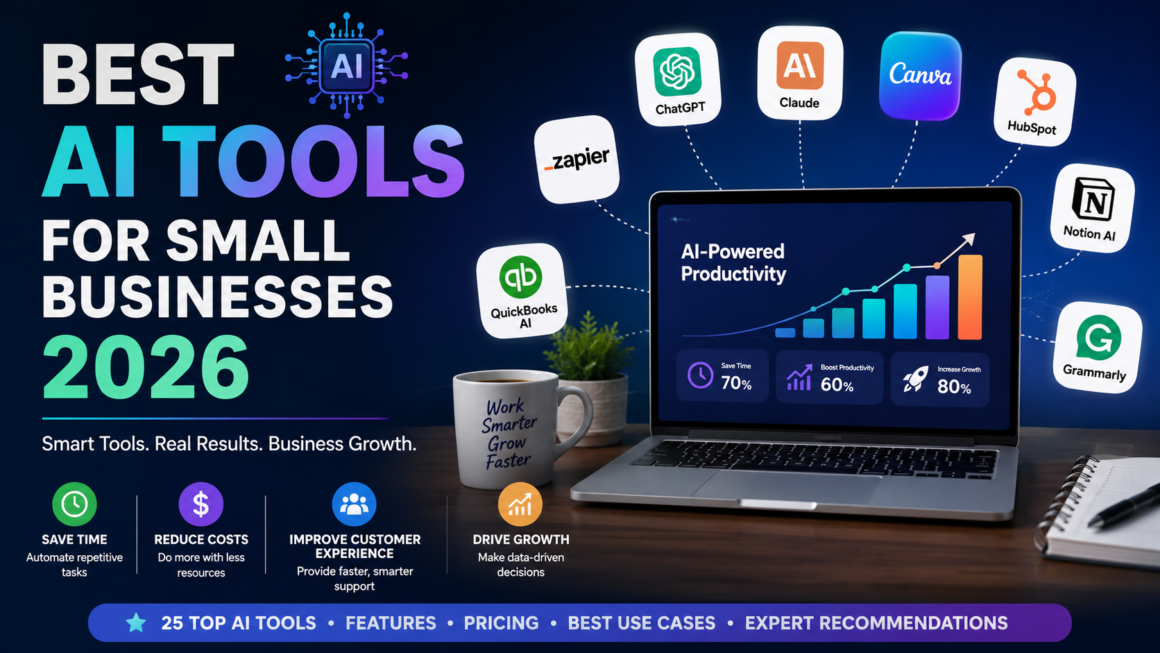
The best AI tools for small businesses in 2026 help automate repetitive tasks, improve customer service, streamline marketing, manage finances, and boost productivity. Top choices include ChatGPT for everyday AI assistance, Claude for document analysis, Gemini for Google Workspace, Canva AI for design, HubSpot AI for CRM, Zapier AI for workflow automation, and QuickBooks AI for accounting. The right combination depends on your business size, budget, and operational needs.
Quick Answer
Artificial intelligence is no longer just for large enterprises. In 2026, affordable AI software enables small businesses to automate routine work, create content faster, improve customer experiences, and make smarter decisions using data.
If you’re looking for the best all-around AI stack, this combination offers excellent value:
| Business Need | Recommended Tool |
| AI Assistant | ChatGPT |
| Marketing Content | Jasper |
| Graphic Design | Canva AI |
| Workflow Automation | Zapier AI |
| CRM & Sales | HubSpot AI |
| Accounting | QuickBooks AI |
| Team Knowledge | Notion AI |
| Customer Support | Intercom Fin |
For most businesses with fewer than 50 employees, adopting just three or four of these tools can save dozens of work hours each month.
Why AI Matters for Small Businesses in 2026
Running a small business has always required balancing limited time, tight budgets, and growing customer expectations. In 2026, those challenges remain—but the tools available to solve them have changed dramatically.
Artificial intelligence has become one of the most practical investments for small businesses because it helps teams do more with fewer resources. Instead of replacing employees, modern AI software handles repetitive tasks, accelerates decision-making, and frees people to focus on higher-value work such as building customer relationships, improving products, and driving growth.
Whether you’re a freelancer, startup founder, retailer, agency owner, or local service provider, AI can improve productivity across nearly every part of your business.
Some of the biggest opportunities include:
- Drafting emails and proposals in minutes
- Creating blog posts and marketing campaigns faster
- Automating repetitive administrative work
- Providing instant customer support
- Managing projects more efficiently
- Generating reports from business data
- Forecasting sales and revenue trends
- Improving SEO and digital marketing performance
Businesses that adopt AI strategically can often reduce manual work, respond to customers faster, and scale operations without immediately increasing headcount.
What Are AI Tools for Small Businesses?
AI tools for small businesses are software applications that use technologies such as machine learning, natural language processing (NLP), and predictive analytics to automate tasks, generate insights, and assist with everyday business operations.
Unlike traditional software that requires explicit instructions for every process, AI systems can analyze information, identify patterns, and generate recommendations based on context.
For example:
- An AI writing assistant can draft a marketing email from a short prompt.
- A customer support chatbot can answer common questions 24/7.
- An AI accounting platform can categorize expenses automatically.
- A CRM can prioritize leads based on the likelihood of conversion.
- A design tool can generate branded social media graphics in seconds.
These capabilities allow small businesses to work more efficiently while maintaining high-quality output.
Benefits of AI Software for Small Businesses
Save Time on Repetitive Tasks
Many business owners spend hours every week on routine work such as:
- Scheduling meetings
- Responding to emails
- Creating reports
- Updating spreadsheets
- Writing social media posts
AI can automate much of this work, giving teams more time to focus on strategy and customer relationships.
Real-World Example
A digital marketing agency can use AI to generate first drafts of blog posts, summarize client meetings, and create campaign reports. Instead of spending several hours on administrative work, the team can dedicate more time to creative planning and client communication.
Reduce Operating Costs
Hiring additional employees isn’t always possible, especially for startups and small businesses with limited budgets.
AI tools can handle many repetitive tasks at a lower cost than expanding your workforce. While AI won’t replace skilled professionals, it can significantly increase the productivity of existing teams.
Improve Customer Service
Today’s customers expect quick responses, even outside regular business hours.
AI-powered chatbots and virtual assistants can:
- Answer frequently asked questions
- Recommend products
- Schedule appointments
- Route complex inquiries to human agents
- Collect customer information before escalation
This creates a smoother customer experience while reducing support workloads.
Enhance Marketing Performance
AI marketing platforms help businesses produce high-quality content faster.
Common use cases include:
- Writing blog posts
- Creating ad copy
- Generating product descriptions
- Designing social media graphics
- Producing email campaigns
- Optimizing SEO content
- Personalizing customer messages
By combining automation with human review, businesses can publish more consistently without sacrificing quality.
Make Better Business Decisions
Modern AI analytics tools process large amounts of information quickly, helping business owners identify trends that might otherwise go unnoticed.
Examples include:
- Sales forecasting
- Customer purchasing behavior
- Inventory optimization
- Marketing attribution
- Revenue forecasting
- Customer churn prediction
These insights support more informed decision-making based on real data rather than assumptions.
How AI Business Tools Work
Although each platform has unique capabilities, most AI tools follow a similar workflow.
Step 1: Collect Data
AI systems gather information from sources such as:
- Customer interactions
- Business documents
- Emails
- CRM platforms
- Websites
- Financial records
- Marketing campaigns
- Internal knowledge bases
The quality of the output depends heavily on the quality of the input data.
Step 2: Analyze Patterns
Machine learning models examine the data to identify relationships, trends, and recurring behaviors.
For example, an AI sales platform might recognize that customers who download a pricing guide are more likely to request a demo within two weeks.
Step 3: Generate Recommendations
Once the analysis is complete, the AI can:
- Draft content
- Suggest next actions
- Predict future outcomes
- Automate workflows
- Generate reports
- Answer questions
- Personalize customer interactions
Step 4: Improve Through Feedback
Many AI platforms improve over time by learning from user interactions, corrections, and additional data.
Businesses that regularly review and refine AI-generated outputs often achieve better long-term results.
How We Selected the Best AI Tools
To create this list, we evaluated each platform using practical criteria that matter to small business owners.
Ease of Use
Can a non-technical user get started quickly?
Business Value
Does the tool solve real operational challenges or simply add unnecessary complexity?
Automation Capabilities
How effectively does it reduce manual work?
Integrations
Does it connect with commonly used business software such as Google Workspace, Microsoft 365, CRM systems, or accounting platforms?
Pricing
Is the tool affordable for startups and small businesses?
Scalability
Can it continue to provide value as the business grows?
Customer Support
Are documentation, tutorials, and support resources readily available?
Best AI Tools for Small Businesses 2026
1. ChatGPT
Best For
Overall business productivity and everyday AI assistance.
Overview
ChatGPT has evolved into one of the most versatile AI business tools available. It can assist with writing, research, brainstorming, coding, customer support, document creation, data analysis, and strategic planning.
Its flexibility makes it valuable across industries, from marketing agencies and eCommerce stores to consulting firms and local service businesses.
Key Features
- Content creation
- Brainstorming ideas
- Business planning
- Data analysis
- Image generation
- Custom AI assistants
- Voice conversations
- File uploads and document analysis
- Coding assistance
- Meeting preparation
Pros
- Easy to learn
- Highly versatile
- Supports multiple business functions
- Large ecosystem of integrations
- Excellent for productivity
Cons
- Requires human review for factual accuracy
- Advanced capabilities are available on paid plans
Best Use Cases
- Marketing agencies
- Consultants
- Freelancers
- Small retailers
- Startups
- Professional services
2. Claude
Best For
Long-form writing, document analysis, and strategic thinking.
Overview
Claude excels at understanding lengthy documents and producing clear, well-structured responses. Businesses working with contracts, policies, research papers, technical manuals, or detailed reports often benefit from its large context window and thoughtful reasoning.
Key Features
- Long document analysis
- PDF summarization
- Report writing
- Policy reviews
- Brainstorming
- Knowledge management
- Code explanation
Pros
- Excellent writing quality
- Strong reasoning capabilities
- Handles large documents effectively
- Reliable summaries
Cons
- Fewer third-party integrations than some competitors
- Feature availability may vary by region and subscription
Best Use Cases
- Legal firms
- HR teams
- Consulting companies
- Research organizations
- Content publishers
3. Gemini
Best For
Businesses using Google Workspace.
Overview
Gemini integrates directly with Google’s productivity suite, making it especially useful for organizations that rely on Gmail, Docs, Sheets, Slides, Drive, and Meet.
It helps teams work faster without switching between multiple applications.
Key Features
- Gmail assistance
- Google Docs writing support
- Spreadsheet analysis
- AI-generated presentations
- Meeting summaries
- Research assistance
- Workspace automation
Pros
- Deep Google integration
- Easy collaboration
- Familiar interface
- Strong productivity features
Cons
- Best experience requires Google Workspace
- Some advanced features depend on subscription tier
4. Canva AI
Best For
Creating professional marketing visuals without design experience.
Overview
Canva AI simplifies graphic design by helping users generate branded visuals, presentations, videos, and social media content quickly. It is particularly valuable for small businesses without an in-house design team.
Key Features
- AI image generation
- Magic Design
- Magic Write
- Presentation creation
- Video editing
- Brand kits
- Social media templates
Pros
- Beginner-friendly
- Extensive template library
- Fast content creation
- Affordable plans
Cons
- Advanced editing is less powerful than specialized design software
- AI-generated assets may require manual refinement
Best Use Cases
- Restaurants
- Local businesses
- eCommerce stores
- Coaches
- Marketing agencies
- Small retailers
5. Jasper
Best For
Scaling marketing and content production.
Overview
Jasper is built specifically for marketing teams that need to create consistent, high-quality content across blogs, email campaigns, advertisements, product pages, and social media.
Its brand voice features help businesses maintain consistency across all communication channels.
Key Features
- Blog writing
- SEO content
- Email marketing
- Ad copy generation
- Product descriptions
- Brand voice management
- Campaign creation
Pros
- Excellent marketing workflows
- Strong collaboration features
- Consistent brand messaging
- Time-saving templates
Cons
- Higher pricing than general-purpose AI assistants
- Best value for teams producing content regularly
6. HubSpot AI
Best For
Sales, CRM, and customer relationship management.
Overview
HubSpot AI combines customer relationship management with intelligent automation to help businesses attract leads, manage pipelines, and improve customer engagement.
Its AI capabilities assist sales teams by drafting emails, summarizing interactions, forecasting revenue, and recommending next steps.
Key Features
- AI email generation
- Lead scoring
- Meeting summaries
- CRM automation
- Sales forecasting
- Marketing automation
- Customer insights
Pros
- Comprehensive business platform
- Strong CRM capabilities
- Excellent automation
- Scales with business growth
Cons
- Premium features can become expensive
- Initial setup requires planning
Best Use Cases
- B2B companies
- SaaS businesses
- Marketing agencies
- Growing sales teams
- Professional service firms
7. Zapier AI
Best For
Workflow automation across multiple business applications
Overview
Every small business relies on dozens of apps—email, CRM, accounting, project management, marketing, and customer support. Manually transferring information between these platforms wastes valuable time and increases the risk of errors.
Zapier AI connects thousands of business applications and automates repetitive workflows using natural language. Instead of creating complex automation rules, you can describe the workflow you want, and AI builds it for you.
Key Features
- AI-powered workflow builder
- 7,000+ app integrations
- Multi-step automations
- AI chatbot actions
- Email automation
- Lead routing
- Document processing
Pros
- No coding required
- Massive integration library
- Saves significant administrative time
- Highly scalable
Cons
- Advanced workflows can become expensive
- Initial workflow planning requires some effort
Best Use Cases
- Marketing agencies
- Ecommerce stores
- Consulting firms
- Sales teams
- Online service businesses
8. Notion AI
Best For
Knowledge management and team productivity
Overview
Notion AI transforms a standard workspace into an intelligent knowledge hub. It helps teams write documentation, summarize meetings, organize projects, and search company information using natural language.
Instead of searching through dozens of documents, employees can simply ask questions and receive contextual answers.
Key Features
- AI writing
- Meeting summaries
- Knowledge search
- Project planning
- Wiki generation
- Task management
- Content organization
Pros
- Excellent collaboration
- Strong documentation capabilities
- Easy knowledge sharing
- Affordable pricing
Cons
- Learning curve for new users
- Best value when the team fully adopts Notion
Best Use Cases
- Agencies
- Remote teams
- Startups
- Product teams
- Consultants
9. Microsoft Copilot
Best For
Businesses using Microsoft 365
Overview
Microsoft Copilot brings AI directly into Word, Excel, Outlook, Teams, and PowerPoint.
For organizations already using Microsoft’s ecosystem, Copilot reduces context switching and accelerates everyday office tasks.
Key Features
- AI in Excel
- AI presentations
- Email drafting
- Teams meeting summaries
- Word document generation
- Business analytics
- Outlook assistance
Pros
- Native Microsoft integration
- Strong enterprise security
- Excellent productivity features
Cons
- Best value within Microsoft ecosystem
- Premium features require business subscriptions
10. QuickBooks AI
Best For
Accounting and bookkeeping
Overview
Managing finances is often one of the most time-consuming responsibilities for small business owners.
QuickBooks AI simplifies bookkeeping by categorizing expenses, identifying unusual transactions, generating financial reports, and forecasting cash flow.
Key Features
- Expense categorization
- Invoice management
- Cash-flow forecasting
- Financial insights
- Automated bookkeeping
- Tax preparation support
Pros
- Saves accounting time
- Reduces bookkeeping errors
- Excellent reporting
Cons
- Subscription costs increase with advanced features
- Some manual review is still necessary
11. Grammarly AI
Best For
Professional business communication
Key Features
- Grammar correction
- Tone adjustment
- Email rewriting
- Business writing
- Brand voice
- AI content suggestions
Best Use Cases
- Customer support
- Sales teams
- HR
- Marketing
- Executive communication
12. Intercom Fin
Best For
AI customer support
Overview
Intercom Fin answers customer questions using your existing documentation and knowledge base.
Instead of relying on scripted chatbot responses, it provides conversational answers that feel more natural and helpful.
Key Features
- AI customer support
- Knowledge base integration
- Live chat escalation
- Ticket automation
- Customer insights
13. Fireflies.ai
Best For
Meeting transcription
Key Features
- Meeting recording
- AI summaries
- Action items
- Searchable transcripts
- CRM integrations
14. Otter.ai
Best For
Voice transcription and meeting notes
Ideal for:
- Sales calls
- Interviews
- Team meetings
- Training sessions
15. ClickUp AI
Best For
Project management
AI assists with:
- Task creation
- Project summaries
- Documentation
- Team planning
- Progress reporting
16. Asana AI
Best For
Managing team workflows
Asana AI helps teams:
- Prioritize work
- Generate updates
- Identify project risks
- Automate recurring tasks
17. Monday.com AI
Best For
Operations management
Useful for:
- Marketing campaigns
- HR
- Sales pipelines
- Client onboarding
- Operations
18. Salesforce Einstein
Best For
Growing sales organizations
Capabilities include:
- Lead scoring
- Sales forecasting
- Customer insights
- Opportunity recommendations
19. Surfer SEO
Best For
SEO content optimization
Helps businesses:
- Optimize blog posts
- Improve keyword coverage
- Increase topical authority
- Enhance on-page SEO
20. Semrush AI Toolkit
Best For
Digital marketing and competitive research
Useful for:
- Keyword research
- Competitor analysis
- Content planning
- PPC optimization
- Website audits
21. Copy.ai
Best For
Sales outreach and marketing copy
Creates:
- Cold emails
- Product descriptions
- Landing pages
- Social media posts
- Ad copy
22. Descript
Best For
Podcast and video editing
Features include:
- AI voice editing
- Video editing
- Screen recording
- Captions
- Transcription
23. ElevenLabs
Best For
AI voice generation
Perfect for:
- Training videos
- Podcasts
- Marketing videos
- Product demonstrations
24. Midjourney
Best For
Creative image generation
Ideal for:
- Marketing campaigns
- Product concepts
- Advertising visuals
- Brand illustrations
25. Perplexity
Best For
Business research
Unlike traditional AI chatbots, Perplexity provides cited answers, making it useful for:
- Market research
- Competitor research
- Industry analysis
- Fact-checking
AI Tools Comparison Table
| Tool | Primary Use | Free Plan | Best For | Starting Price |
| ChatGPT | AI Assistant | Yes | Overall productivity | $20/month |
| Claude | Writing & Documents | Yes | Long documents | Paid plans available |
| Gemini | Google Workspace | Yes | Google users | Workspace plans vary |
| Canva AI | Design | Yes | Marketing | Pro plan available |
| Jasper | Marketing | Trial | Content teams | From ~$49/month |
| HubSpot AI | CRM | Yes | Sales & CRM | Paid hubs available |
| Zapier AI | Automation | Limited | Workflow automation | From ~$20/month |
| Notion AI | Documentation | Limited | Teams | AI add-on available |
| Copilot | Microsoft 365 | No | Office productivity | Microsoft 365 plans |
| QuickBooks AI | Accounting | Trial | Finance | Region-specific pricing |
| Grammarly | Writing | Yes | Communication | Premium available |
| Intercom Fin | Support | No | Customer service | Custom pricing |
| Fireflies | Meetings | Yes | Sales meetings | Premium available |
| Otter | Transcription | Yes | Meetings | Premium available |
| ClickUp AI | Project Management | Trial | Teams | AI add-on |
| Asana AI | Projects | Limited | Operations | Premium plans |
| Monday AI | Operations | Trial | Workflow | Premium plans |
| Salesforce Einstein | CRM | No | Enterprise sales | Custom pricing |
| Surfer SEO | SEO | No | Content optimization | Premium plans |
| Semrush AI | Marketing | Trial | SEO/PPC | Premium plans |
| Copy.ai | Marketing | Yes | Sales content | Premium plans |
| Descript | Video | Yes | Creators | Premium plans |
| ElevenLabs | Voice AI | Yes | Audio | Premium plans |
| Midjourney | Images | No | Designers | Subscription |
| Perplexity | Research | Yes | Business research | Pro available |
AI Tool Recommendations by Business Type
Local Businesses
Recommended Stack
- ChatGPT
- Canva AI
- Grammarly
- QuickBooks AI
- Zapier AI
Perfect for:
- Restaurants
- Salons
- Gyms
- Clinics
- Retail stores
Marketing Agencies
Recommended Stack
- ChatGPT
- Claude
- Jasper
- Canva AI
- Surfer SEO
- Semrush
- Notion AI
- Descript
E-commerce Stores
Recommended tools include:
- ChatGPT
- Shopify Magic (if using Shopify)
- Canva AI
- Zapier AI
- HubSpot AI
- QuickBooks AI
These tools help create product descriptions, automate order workflows, manage customer relationships, and streamline financial tracking.
SaaS Companies
A strong AI stack for SaaS businesses includes:
- ChatGPT
- Claude
- HubSpot AI
- Salesforce Einstein
- Notion AI
- ClickUp AI
- Fireflies.ai
This combination supports product development, customer success, sales, and internal documentation.
Professional Services
Businesses such as consultants, legal firms, accountants, and agencies benefit from:
- Claude
- ChatGPT
- Notion AI
- Grammarly AI
- Otter.ai
- QuickBooks AI
These tools improve client communication, document management, meeting summaries, and financial administration.
Freelancers and Solopreneurs
If you’re running a business on your own, focus on tools that deliver the greatest impact without creating unnecessary complexity.
Recommended stack:
- ChatGPT
- Canva AI
- Grammarly AI
- Notion AI
- Zapier AI
Together, these tools can help you create content, manage projects, automate repetitive tasks, and maintain a professional brand presence.
How to Choose the Right AI Tool for Your Small Business
Choosing the right AI software isn’t about finding the platform with the most features—it’s about solving your biggest business challenges.
Before investing in any AI tool, identify where your team spends the most time. The best AI solution should remove bottlenecks, improve efficiency, and deliver measurable value.
Step 1: Identify Your Biggest Pain Point
Ask yourself:
- Do you spend too much time writing emails and content?
- Is customer support overwhelming your team?
- Are repetitive administrative tasks slowing operations?
- Is marketing taking longer than expected?
- Are financial reports difficult to manage?
- Does your team struggle to find information quickly?
Start by solving one problem rather than trying to automate everything at once.
Step 2: Define Your Budget
AI software ranges from free tools to enterprise platforms with custom pricing.
A practical starting budget for most small businesses is:
| Business Size | Suggested Monthly AI Budget |
| Solo Entrepreneur | $20–$50 |
| 2–10 Employees | $50–$200 |
| 10–50 Employees | $200–$1,000 |
| 50+ Employees | Custom enterprise pricing |
Choose tools that provide clear ROI instead of paying for features you won’t use.
Step 3: Check Integrations
AI tools deliver the most value when they work with your existing software.
Look for integrations with:
- Google Workspace
- Microsoft 365
- Slack
- Shopify
- WooCommerce
- HubSpot
- Salesforce
- QuickBooks
- Stripe
- Zapier
The fewer manual steps required, the greater the productivity gains.
Step 4: Prioritize Security and Compliance
If your business handles customer, financial, or confidential data, review:
- Data encryption
- User permissions
- Compliance certifications (such as GDPR or SOC 2, where applicable)
- Data retention policies
- AI training policies
- Audit logs
Understanding how your data is stored and processed is just as important as evaluating AI features.
Step 5: Start Small and Measure Results
Instead of deploying multiple AI tools at once, begin with one or two high-impact solutions.
Track metrics such as:
- Hours saved each week
- Customer response time
- Marketing output
- Sales conversion rate
- Cost savings
- Employee satisfaction
Once you see measurable improvements, expand your AI stack gradually.
Step-by-Step Guide: Implementing AI in Your Small Business
A successful AI rollout focuses on solving real business problems—not adopting technology for its own sake.
Step 1: Audit Existing Processes
List repetitive tasks performed daily, weekly, and monthly.
Examples include:
- Writing emails
- Scheduling meetings
- Creating invoices
- Responding to customer inquiries
- Updating spreadsheets
- Preparing reports
- Managing social media
These tasks are often the best candidates for automation.
Step 2: Choose One Business Function
Focus on a single department first.
For example:
- Marketing
- Customer support
- Finance
- Sales
- HR
- Operations
This makes implementation easier and helps your team adapt more quickly.
Step 3: Train Your Team
AI works best when employees understand:
- What the tool can do
- Its limitations
- When human review is required
- How to write effective prompts
- Best practices for protecting sensitive information
Investing a small amount of time in training can significantly improve adoption and outcomes.
Step 4: Create Standard Operating Procedures (SOPs)
Document how AI should be used.
Include guidance such as:
- Approved prompts
- Brand voice requirements
- Review processes
- Privacy guidelines
- Quality assurance checklists
Clear SOPs help ensure consistent results across your team.
Step 5: Review and Optimize
AI is not a “set it and forget it” solution.
Review outputs regularly and refine workflows based on:
- User feedback
- Customer satisfaction
- Business performance
- Time savings
- ROI
Continuous improvement is key to maximizing long-term value.
Pros and Cons of AI for Small Businesses
| Pros | Cons |
| Automates repetitive work | Requires human review for important decisions |
| Improves productivity | Subscription costs can add up |
| Reduces operational costs | Learning curve for some tools |
| Enhances customer service | Quality depends on input data |
| Supports data-driven decisions | Integration may require setup time |
| Helps small teams scale | Some advanced features require premium plans |
| Accelerates content creation | Privacy and compliance must be managed carefully |
Best Use Cases by Department
| Department | Recommended AI Tools |
| Marketing | ChatGPT, Jasper, Canva AI, Surfer SEO |
| Sales | HubSpot AI, Salesforce Einstein, Grammarly |
| Customer Support | Intercom Fin, ChatGPT |
| Finance | QuickBooks AI |
| Operations | Zapier AI, ClickUp AI, Monday AI |
| HR | Claude, Notion AI |
| Executive Leadership | Perplexity, ChatGPT, Claude |
Common Mistakes to Avoid
1. Trying to Automate Everything
AI works best when introduced gradually. Start with one process, evaluate the results, and expand based on proven success.
2. Ignoring Human Review
AI can make mistakes or produce outdated or incomplete information. Critical content, financial reports, legal documents, and customer communications should always be reviewed by a qualified person before use.
3. Choosing Too Many Tools
Using several platforms with overlapping features increases costs and complexity.
Select a focused set of tools that integrate well with your existing workflow.
4. Overlooking Data Security
Before uploading sensitive business information, understand:
- Where data is stored
- Who has access
- How it is protected
- Whether the platform meets your compliance requirements
5. Not Measuring ROI
Without clear metrics, it’s difficult to know whether AI is improving your business.
Track measurable outcomes such as:
- Time saved
- Revenue growth
- Customer satisfaction
- Cost reduction
- Employee productivity
Expert Tips for Getting the Most from AI
- Start with one high-impact use case before expanding.
- Combine general-purpose AI assistants with specialized business software.
- Build prompt templates for repetitive tasks to improve consistency.
- Keep your brand voice documented and review AI-generated content before publishing.
- Schedule regular audits of your AI workflows to identify opportunities for improvement.
- Stay informed about new AI features—many platforms release updates frequently.
- Encourage employees to share successful workflows so the whole team benefits.
People Also Ask
What is the best AI tool for small businesses in 2026?
For overall productivity, ChatGPT is a strong choice. However, the best solution depends on your needs. HubSpot AI is well suited for CRM, Zapier AI for automation, Canva AI for design, and QuickBooks AI for accounting.
Are AI tools worth it for small businesses?
Yes. When implemented thoughtfully, AI tools can reduce repetitive work, improve customer experiences, and help teams accomplish more without increasing headcount.
Can AI replace employees in a small business?
AI is better viewed as an assistant rather than a replacement. It excels at handling repetitive tasks, while people remain essential for strategy, creativity, relationship building, and decision-making.
How much do AI business tools cost?
Costs vary widely. Many platforms offer free plans or trials, while premium subscriptions typically range from $20 to several hundred dollars per month, depending on features, users, and business requirements.
Which AI tool is best for marketing?
Many businesses combine ChatGPT for ideation and drafting, Jasper for marketing workflows, Canva AI for design, and Surfer SEO for content optimization.
Which AI tool is best for accounting?
QuickBooks AI is a popular option for bookkeeping, invoicing, expense tracking, and financial reporting.
Frequently Asked Questions
What is AI software for small businesses?
AI software helps automate tasks, generate insights, improve communication, and streamline operations using artificial intelligence technologies.
Can small businesses use AI on a limited budget?
Yes. Many AI platforms provide free plans or affordable entry-level subscriptions, making them accessible to startups and small teams.
Is AI difficult to implement?
Most modern AI tools are designed for non-technical users and offer tutorials, templates, and guided onboarding to simplify adoption.
How do I know if an AI tool is delivering value?
Measure outcomes such as time saved, customer satisfaction, operational efficiency, lead generation, or revenue growth. Compare these metrics before and after implementation.
Will AI work with my existing software?
Many leading AI platforms integrate with popular business tools, including Google Workspace, Microsoft 365, HubSpot, Salesforce, Shopify, QuickBooks, Slack, and thousands of other applications through automation platforms.
How often should I review my AI workflows?
Review your workflows regularly—especially after major software updates or business process changes—to ensure they continue to meet your goals and deliver accurate results.
Key Takeaways
- AI has become an essential productivity tool for businesses of all sizes.
- The best AI solution depends on your business goals, workflows, and budget.
- Start with one or two tools that solve your biggest operational challenges.
- Combine general-purpose AI assistants with specialized software for the best results.
- Human oversight remains critical for quality, compliance, and strategic decision-making.
- Measuring ROI helps you expand your AI investments with confidence.
Final Verdict
The best AI tools for small businesses in 2026 are those that solve real business problems—not simply those with the longest feature lists.
For most organizations, a balanced AI stack might include ChatGPT for everyday productivity, Canva AI for design, HubSpot AI for CRM, Zapier AI for automation, QuickBooks AI for finance, and Notion AI for documentation and collaboration.
Rather than replacing employees, these tools help teams work smarter, reduce repetitive tasks, improve customer experiences, and scale operations more efficiently.
The most successful businesses won’t be the ones using the most AI—they’ll be the ones using AI intentionally to support people, streamline workflows, and make better decisions.
Conclusion
Artificial intelligence is reshaping how small businesses operate, compete, and grow. From automating routine work to enhancing customer service and improving marketing performance, today’s AI solutions offer practical benefits for businesses across every industry.
The key is to adopt AI with a clear strategy. Start by identifying your biggest operational challenge, select tools that integrate with your existing systems, train your team effectively, and measure results over time.
With the right approach, the best AI tools for small businesses 2026 can help you save time, control costs, and build a more agile, productive business that is ready for future growth.