


Every company has tasks that eat time without adding much value: copying data between tools, sorting emails, chasing approvals, writing the same reply for the hundredth time. AI automation takes these tasks off your team’s plate so people can focus on work that needs judgment, creativity, and relationships.
The challenge is knowing where to begin. This guide explains what AI automation is, how it differs from traditional automation, and gives you 10 practical workflows you can start with, along with a simple plan to set them up safely.
This post is part of our AI for business series. For the big picture, read our pillar guide: Droven.io AI for Business: What It Is and How to Use AI in Your Company (https://bytebenz.com/droven-io-ai-for-business/).
What Is AI Automation?
AI automation means using artificial intelligence to complete or assist with tasks that used to require a person. It combines two things: automation, which moves information and triggers actions between tools, and AI, which can read text, understand intent, summarize, classify, and make simple decisions.
Traditional Automation vs AI Automation
Traditional automation follows fixed rules. For example: “When a form is submitted, add a row to a spreadsheet.” It works well when inputs are predictable and structured.
AI automation handles messy, real-world inputs. For example: “When a customer email arrives, read it, decide whether it is a billing question, a complaint, or a sales inquiry, draft a reply, and route it to the right person.” The AI interprets language that does not follow a fixed format.
Where AI Agents Fit In
An AI agent goes one step further. Instead of following one workflow, it can plan a series of steps, use tools, and work toward a goal with limited supervision. Agents are powerful but need careful limits and human review. To see how they work in practice, read our guide to AI agents examples (https://bytebenz.com/ai-agents-examples/).
Why Businesses Automate With AI
- Time: repetitive tasks take less time, so teams can focus on higher-value work.
- Consistency: automated steps follow the same process every time, which reduces missed follow-ups and manual errors.
- Speed: customers and leads get faster responses.
- Scalability: you can handle more volume without hiring at the same pace.
- Better data: information is captured and organized as work happens.
AI automation is not magic. It works best on tasks that are frequent, well understood, and easy to check. It works poorly on tasks that are rare, ambiguous, or high risk without human review.
How to Pick the Right Task to Automate
Before the list, use this quick filter. A good first automation usually has these traits:
- It happens often, at least weekly.
- It follows a pattern a new employee could learn in a day.
- It is low risk if the output is slightly wrong.
- It is easy to measure, such as minutes saved or response time.
- The data involved is not highly sensitive.
If a task meets most of these, it is a strong candidate. Now let us look at 10 workflows that do.
10 AI Workflows to Start With
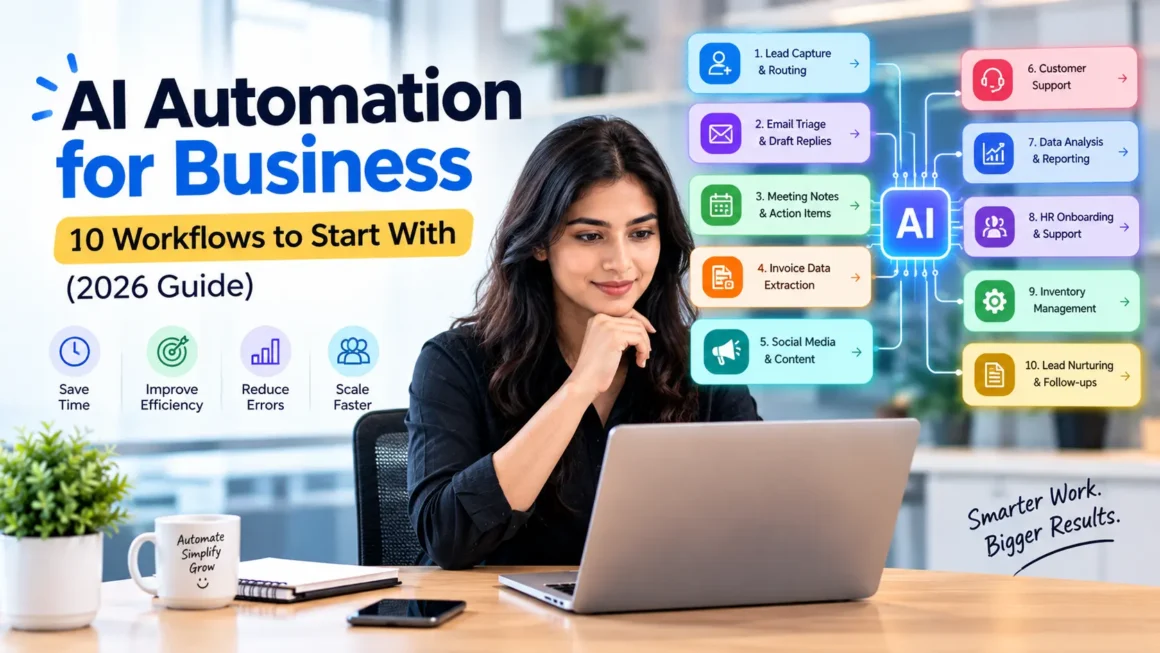
1. Lead Capture and Routing
What it does: When a new lead arrives from a form, email, or chat, AI reads the message, identifies the need and urgency, adds the lead to your CRM, and assigns it to the right salesperson.
Why it works: Speed matters in sales, and manual sorting causes delays. Automation makes sure no lead sits unanswered.
Human check: A salesperson reviews the first contact before it goes out, at least during the pilot.
2. Customer Email Triage and Draft Replies
What it does: AI categorizes incoming support emails, such as billing, shipping, technical issue, or complaint, and drafts a suggested reply using your help documents.
Why it works: Many support questions repeat. Drafts save writing time while keeping a person in control.
Human check: Agents approve or edit every reply until accuracy is proven.
3. Meeting Notes and Action Items
What it does: AI transcribes a meeting, summarizes key points, lists decisions, and extracts action items with owners and due dates, then posts them to your project tool.
Why it works: Follow-up is where most meetings fail. Automated summaries make tasks visible.
Human check: The organizer reviews the summary before sharing, especially for sensitive discussions.
4. Invoice and Receipt Data Extraction
What it does: AI reads invoices and receipts from email or uploads, pulls out vendor, date, amount, and category, and enters them into your accounting software.
Why it works: Manual data entry is slow and error-prone. Extraction handles the routine cases.
Human check: Flag unusual amounts, new vendors, or low-confidence extractions for review.
5. Social Media and Content Repurposing
What it does: You publish one long piece, such as a blog post or webinar. AI creates a short summary, social posts, an email blurb, and a list of key quotes in your brand voice.
Why it works: Repurposing multiplies the value of content you already created.
Human check: Edit for tone, accuracy, and brand fit before publishing. Never post unedited AI text.
6. Appointment Scheduling and Reminders
What it does: AI handles scheduling requests by email or chat, offers available times, confirms bookings, and sends reminders to reduce no-shows.
Why it works: Back-and-forth scheduling wastes time for both sides.
Human check: Keep a clear path for special cases, such as urgent requests or rescheduling conflicts.
7. Sales Call Summaries and CRM Updates
What it does: After a sales call, AI creates a summary, identifies objections and next steps, and updates the CRM record automatically.
Why it works: Salespeople often skip CRM updates because they are tedious, which leaves records incomplete.
Human check: The rep confirms the summary and any changes to deal stage or forecast.
8. Internal Knowledge Assistant
What it does: AI answers employee questions about policies, processes, and documents, using your internal knowledge base as the source and linking back to the original document.
Why it works: People waste time searching for answers or asking colleagues. A good assistant reduces interruptions.
Human check: Keep documents up to date, restrict access to sensitive files, and make sure the assistant cites its sources.
9. Report Generation and Data Summaries
What it does: AI pulls data from your tools each week, writes a plain-English summary of key changes, and highlights unusual numbers for review.
Why it works: Reporting is time-consuming, and busy managers benefit from a clear narrative alongside charts.
Human check: Verify key numbers against the source before sharing with leadership.
10. Job Application Screening Support
What it does: AI helps organize applications, summarize résumés against the job requirements, and draft interview questions.
Why it works: Hiring teams often face large volumes of applications.
Human check: This one needs extra care. AI can reflect bias, so humans must make all decisions, and you should follow local employment laws. Use AI for organization and summarizing, not for final selection.
A Step-by-Step Plan to Set Up Your First Automation
Step 1: Map the Current Process
Write down each step of the task as it happens today: what triggers it, who does what, which tools are involved, and how long it takes. Record a baseline, such as “ten hours per week” or “average reply time of six hours.”
Step 2: Choose Your Tools
Pick tools that connect to the software you already use. Many no-code automation platforms link email, spreadsheets, CRMs, and helpdesks, and many business apps now include built-in AI features. For options, see Best AI Tools for Small Businesses 2026 (https://bytebenz.com/best-ai-tools-for-small-businesses-2026/) and AI Tools by Business Function (https://bytebenz.com/ai-tools-by-business-function/).
Step 3: Build a Small Version First
Automate only part of the workflow, for example drafting replies rather than sending them. Keep a person in the loop for approval.
Step 4: Set Rules for Data and Errors
Decide what data the AI may see, what it must never handle, and what happens when it is unsure. A good automation sends uncertain cases to a human instead of guessing.
Step 5: Pilot for Two to Four Weeks
Run the workflow with a small team, collect feedback, and log mistakes. Adjust prompts, instructions, and rules based on what you see.
Step 6: Measure Against Your Baseline
Compare time saved, error rates, and response times with your starting numbers. Subtract tool costs and setup time to estimate real return.
Step 7: Document and Expand
Write a short guide so others can use and maintain the workflow. Then pick the next task. Build gradually rather than automating everything at once.
Which Tools Can You Use?
You do not need to build everything from scratch. Most businesses combine a few types of tools:
- General AI assistants for drafting, summarizing, and analysis
- No-code automation platforms that connect apps and trigger actions
- Built-in AI features inside your CRM, helpdesk, accounting, and project tools
- Specialized tools for tasks like meeting transcription or document extraction
Be careful with tools you find through articles alone. Some sites describe “AI automation tools” with big claims but no visible product, pricing, or sign-up. Before trusting any tool, run it through our checklist: Is Droven.io Legit? How to Vet Any AI Business Tool (https://bytebenz.com/is-droven-io-legit/).
If off-the-shelf tools cannot handle your needs, you may eventually want a tailored solution. Read How to Build AI Agents (https://bytebenz.com/how-to-build-ai-agents/) and Custom AI Development (https://bytebenz.com/custom-ai-development/) to understand the options.
Risks and How to Manage Them
Inaccurate Output
AI can produce confident but wrong answers. Keep human review for anything customer-facing, financial, legal, or medical, and test on real examples before launch.
Data Privacy
Do not feed sensitive customer or company data into tools you have not vetted. Check where data is stored and whether it is used for model training. Follow regulations that apply to you, such as GDPR and CCPA.
Over-Automation
Automating a poor process just creates faster mistakes. Fix the process first. Also keep human contact available, since customers still want to reach a person when something goes wrong.
Employee Concerns
Be open about your goals. Explain that automation is meant to remove repetitive tasks, and offer training so people can work effectively alongside AI.
Dependence on One Tool
If a workflow relies on a single vendor, a price change or outage can disrupt it. Document your processes and know how to export your data.
How to Measure Success
Track a few simple metrics for each workflow:
- Time saved per week
- Error rate before and after
- Response or turnaround time
- Volume handled
- Cost of tools and setup time
- Team and customer feedback
If the numbers do not improve after a fair pilot, adjust or stop. Not every automation will pay off, and that is normal.
Common Mistakes to Avoid
- Starting with a complex, high-risk process instead of a simple one
- Skipping the baseline, so you cannot prove results
- Removing human review too early
- Using sensitive data in unvetted tools
- Building many automations at once with no owner for each
- Never revisiting workflows as your business changes
Frequently Asked Questions
What is AI automation for business?
It is the use of AI to complete or assist with business tasks such as sorting emails, extracting data, drafting replies, and summarizing meetings, often connected across your existing software.
What is the best first workflow to automate?
Choose a task that is frequent, low risk, and easy to measure. Email triage with draft replies, meeting summaries, and invoice data extraction are common starting points.
Do I need coding skills to automate with AI?
Not necessarily. Many no-code platforms and built-in AI features let non-technical teams build workflows. More complex or custom automations may need developer help.
Is AI automation expensive?
Costs vary widely. Some features are included in tools you already pay for, while others require subscriptions or setup time. Start with a small pilot so you can compare cost against measured savings.
Will AI automation replace my team?
In most cases it changes tasks rather than removing whole roles. It handles repetitive work so employees can focus on judgment, creativity, and customer relationships.
How do I keep AI automation safe?
Limit the data it can access, keep humans in the loop for important decisions, test before launch, choose vendors with clear security terms, and monitor results regularly.
How is an AI agent different from a simple automation?
A simple automation follows a fixed workflow. An agent can plan steps, use tools, and adapt to reach a goal. Agents offer more flexibility but need stricter limits and oversight.
Conclusion
AI automation works best when you start small, choose the right task, and keep people involved. Pick one workflow from the list above, map it, run a short pilot, and measure the result. If it saves time without hurting quality, expand to the next one.
Do this step by step and AI automation becomes a steady source of efficiency rather than a risky experiment.
Want the full picture? Read our pillar guide: Droven.io AI for Business: What It Is and How to Use AI in Your Company (https://bytebenz.com/droven-io-ai-for-business/).