


If you asked this question in early 2026, the answer was a straightforward tradeoff: Claude Code vs Gemini CLI for price. That’s no longer the full picture.
Quick answer: Claude Code remains the stronger choice for supervised, high-stakes coding work—permissions, project rules, and multi-file refactors are its strength. Gemini CLI, as a standalone product, has been retired for individual and free-tier users as of June 18, 2026, and replaced by Antigravity CLI.
If you’re comparing “Claude Code vs Gemini CLI” today, you’re really comparing Claude Code against Antigravity CLI for anyone outside an enterprise Gemini Code Assist license.
This guide covers both realities: how the two tools compared while Gemini CLI was active, and what changed for developers who still have the old command in their muscle memory.
Quick Answer
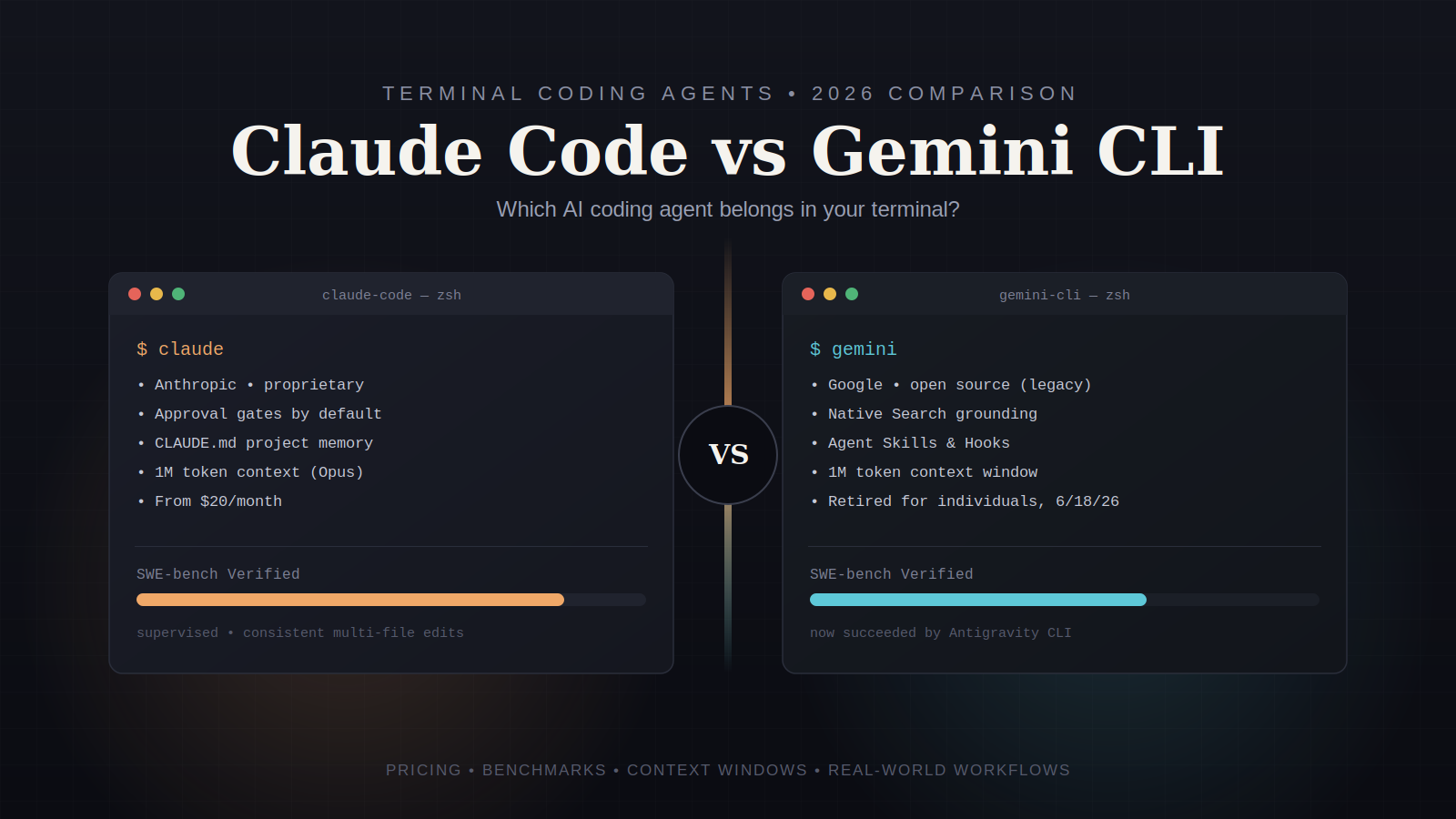
Claude Code is Anthropic’s proprietary, subscription-based terminal coding agent, built around Claude Opus and Sonnet models, permission gating, and project-level memory files (CLAUDE.md).
Gemini CLI was Google’s open-source terminal agent, free for individual developers with a generous daily request quota, until Google retired it for that tier on June 18, 2026 in favor of Antigravity CLI.
For most developers deciding right now:
- Want a supervised agent with approval gates and consistent multi-file editing? Choose Claude Code.
- Already on a Google AI Pro or Ultra plan and want the closest thing to the old Gemini CLI experience? Choose Antigravity CLI.
- On an enterprise Gemini Code Assist license? You can still run the legacy Gemini CLI.
What Changed: The Gemini CLI Shutdown
This matters enough to state plainly before comparing features, because it changes the actual decision most people are making.
Google announced at I/O 2026 (May 19) that Gemini CLI and the Gemini Code Assist IDE extensions would stop serving requests for Google AI Pro, Ultra, and free-tier individual accounts on June 18, 2026.
That deadline has passed. As of this writing, running the legacy Gemini command on a personal Google account returns nothing—no grace period, no soft landing.
Google’s replacement is Antigravity CLI, a closed-source Go rewrite that shares its agent harness with the new Antigravity 2.0 desktop app. It keeps the core extensibility features developers relied on—Agent Skills, Hooks, and Subagents—but the free tier shrank dramatically, from roughly 1,000 requests a day down to about 20, and a Google AI Pro subscription is now required for meaningful use.
Enterprise customers on Gemini Code Assist Standard or Enterprise licenses, or those authenticating through a paid Vertex AI or Gemini Enterprise Agent Platform API key, are unaffected and can keep using the original Gemini CLI.
Why this matters for your decision: if you’re weighing “free and open source” against “paid and proprietary,” that calculation no longer applies the way it did in Q1 2026. The realistic 2026 comparison for individual developers is Claude Code vs Gemini CLI, and this article treats that as the practical framing while still covering Gemini CLI’s technical DNA, since Antigravity CLI inherited most of it.
Overview: What Each Tool Actually Is
Claude Code is Anthropic’s agentic coding CLI. It runs in your terminal, reads and edits files autonomously, executes shell commands, and can spawn sub-agents for parallel work on larger tasks.
It’s built on Claude Opus and Sonnet models and is designed around a permission system: read-only actions run without asking, but file modifications and command execution require your sign-off unless you explicitly enable a less-restricted mode.
The Gemini CLI / Antigravity CLI started life as Google’s open-source (Apache 2.0) terminal agent powered by Gemini 2.5 Pro, with a 1M-token context window and native Google Search grounding—meaning the agent could pull current documentation or library versions mid-task. Antigravity CLI keeps the 1M context window and the plugin architecture (Gemini CLI’s “Extensions” are now called “plugins”) but drops the open-source license and the generous free tier.
Both tools solve the same underlying problem: letting an AI agent work directly in your shell instead of through an IDE plugin so it can run tests, chain commands, and touch multiple files without you copy-pasting code back and forth.
Core Features Compared
Context window and codebase reasoning
Both tools now support a 1M-token context window, so the “context gap” that used to favor Gemini CLI has closed. Claude Code includes the 1M window automatically for Max, Team, and Enterprise users on Opus; Pro plan users get it at standard per-token rates. Antigravity CLI retains Gemini’s 1M window across its tiers.
The practical difference is efficiency, not raw size. In head-to-head tests on identical tasks, Gemini-based tools have used noticeably more input tokens to reach the same result compared with Claude Code — meaning you can burn through quota faster even with the same context ceiling.
Approval gates and safety
This is where the two philosophies genuinely diverge. Claude Code asks for confirmation before it modifies a file or runs a command, unless you’ve explicitly turned that off. The Gemini CLI (and Antigravity CLI) leans toward running tools and presenting results, without a built-in plan/act toggle for developers who want to review every step first.
If your team needs an audit trail of what an agent did and why, Claude Code’s default behavior gives you that out of the box. If you want speed and don’t mind reviewing after the fact, the Google tooling’s approach feels faster in daily use.
Project memory and rules
Claude Code uses CLAUDE.md files to store project-specific context, coding conventions, and instructions the agent should follow every session. This is one of its most underrated features: teams that write a good CLAUDE. Md MDs see far fewer “the agent ignored our style guide” complaints than teams that don’t.
Antigravity CLI inherited Gemini CLI’s agent skills and hooks, which serve a similar purpose—reusable instructions and triggers the agent applies automatically—but the ecosystem around them is newer and less battle-tested.
Web grounding
Native Google Search grounding was Gemini CLI’s standout feature, and it carries over to Antigravity CLI. The agent can look up current API docs or migration guides mid-task without you feeding it a URL. Claude Code doesn’t have an equivalent built-in web search tool in the base product; it relies more heavily on what’s in your codebase and what you supply directly.
Sub-agents and parallel work
Claude Code supports spawning sub-agents for parallel work on larger tasks, and an experimental “Agent Teams” feature (enabled via an environment flag on Team and Enterprise plans let multiple sessions share a task list. Antigravity CLI supports asynchronous background workflows, letting tasks run without locking your terminal session—a structural improvement over the original Gemini CLI, which streamed terminal state via PTY and tied up your shell while working.
How Each Tool Works
Claude Code operates on a request-review-execute loop. You describe a task, Claude proposes a plan or a diff, and—depending on your permission settings—either waits for your approval or proceeds automatically for lower-risk actions, like reading files. It maintains session memory and can reference your CLAUDE.md file to stay consistent with project conventions across long sessions.
The Antigravity CLI (and legacy Gemini CLI) runs a reason-and-act loop where the agent decides which tool to call—file read/write, shell execution, or web search—and generally executes without an interim approval step, then shows you what it did. This makes it feel faster for quick iterations but requires more trust in the agent’s judgment upfront.
Step-by-Step: Getting Started with Each Tool
Setting up Claude Code:
- Install Claude Code via your terminal (requires an Anthropic account and an active Pro, Max, Team, or Enterprise plan).
- Authenticate with your Anthropic credentials.
- Navigate to your project directory and run the agent’s init command to generate a starter CLAUDE.md file.
- Edit CLAUDE.md to add your team’s conventions, testing commands, and any file paths the agent should avoid.
- Start a session and give the agent a scoped task — a single bug fix or a small feature, not “rebuild the app.”
- Review each proposed change before approving; adjust CLAUDE.md as you notice recurring corrections.
Setting up Antigravity CLI (for former Gemini CLI users):
- Sign up for Google AI Pro (the free tier is no longer sufficient for regular use).
- Install Antigravity CLI and authenticate with your Google account.
- Replace Gemini with the new AGY command in any scripts, aliases, or CI/CD configuration—this step is easy to miss and breaks automation silently.
- Confirm your existing extensions migrated correctly as plugins.
- Test in a low-stakes repo before pointing it at production code, since feature parity with the old Gemini CLI isn’t complete at launch.
Claude Code vs Gemini CLI: Comparison Table
| Category | Claude Code | Gemini CLI (legacy) / Antigravity CLI |
| License | Proprietary | Gemini CLI: open source (Apache 2.0). Antigravity CLI: closed source |
| Base cost | $20/month (Pro) | The free tier ended for individuals on June 18, 2026. Google AI Pro required now |
| Context window | 1M tokens (Opus, Max/Team/Enterprise) | 1M tokens (both versions) |
| Approval workflow | Confirms before file edits/commands by default | Executes then reports; no built-in plan/act toggle |
| Web search grounding | Not native to base product | Native Google Search grounding |
| Project memory | CLAUDE.md files | Agent Skills, Hooks |
| Parallel/async work | Sub-agents, experimental Agent Teams | Asynchronous background workflows (Antigravity) |
| SWE-bench Verified (public benchmarks, early 2026) | ~80–87% range depending on model version | ~63–64% (Gemini 2.5 Pro) |
| Enterprise continuity | Same product across tiers | Enterprise licenses retain legacy Gemini CLI access |
| User satisfaction (JetBrains, April 2026 survey) | 91% CSAT, 54 NPS—highest tracked | Not separately ranked in that survey |
Benchmark numbers shift with each model release, so treat SWE-bench figures as directional rather than final—verify current scores against each vendor’s published results before making a purchasing decision.
Pros and Cons
Claude Code: Pros
- Consistently strong results on complex, multi-file refactors
- Default approval gates reduce the risk of unreviewed changes reaching production
- CLAUDE.md gives teams a reliable way to enforce conventions
- Highest customer satisfaction scores among coding tools tracked in 2026 surveys
- Stable pricing and product direction — no forced migration to date
Claude Code: Cons
- No free tier; meaningful use starts at $20/month and scales to $100–$200/month for heavy users
- No native web search grounding in the base product
- Closed source, so you can’t audit or self-host the agent’s implementation
Gemini CLI (legacy): Pros
- Was fully open source, auditable, and self-hostable in spirit
- Native Google Search grounding was a genuine differentiator
- 1M context window was available before Claude Code’s
Gemini CLI (legacy): Cons
- Retired for individual and free-tier users as of June 18, 2026
- Less token-efficient than Claude Code on comparable tasks in independent testing
- No built-in approval gate before the agent modifies files
Antigravity CLI: Pros
- Retains the 1M context window and Google Search grounding
- Asynchronous workflows avoid locking your terminal session
- Migrated Agent Skills, Hooks, and Subagents largely intact
Antigravity CLI: Cons
- Closed source, unlike its predecessor
- Free tier shrank from roughly 1,000 requests/day to about 20
- Feature parity with legacy Gemini CLI is incomplete at launch, per Google’s own acknowledgement
Pricing
Claude Code:
- Pro: $20/month, limited usage — fine for solo developers with moderate daily use
- Max 5x: $100/month — the realistic tier for daily professional use
- Max 20x / Team / Enterprise: higher usage caps, usage-based API billing for enterprise deployments
Antigravity CLI / Gemini CLI:
- Free tier: roughly 20 requests/day (down sharply from Gemini CLI’s original 1,000/day)
- Google AI Pro: required for regular individual use, priced alongside Google’s consumer AI subscription
- Enterprise: Google Cloud billing through Gemini Code Assist Standard or Enterprise licenses, which also retain legacy Gemini CLI access
If you’re budgeting for a team, run the math on total monthly requests, not just the sticker price — a cheaper per-seat cost can still cost more in practice if your team burns through quota and needs a higher tier anyway.
Best Use Cases
Choose Claude Code when:
- You’re working on production code that needs review before changes land
- Your team has (or wants) documented coding standards an agent should follow every time
- You’re doing complex, multi-file refactors where consistency matters more than speed
- You need an audit trail of what the agent changed and why
Choose Antigravity CLI when:
- You’re already inside the Google Cloud/Google AI ecosystem
- You want an agent that can pull current documentation via web search mid-task
- Your workflows benefit from asynchronous, non-blocking background tasks
- You’re on an enterprise Gemini Code Assist plan and want continuity with your existing setup
Who Should Use Which Tool
- Solo developers and freelancers: Claude Code’s Pro tier is affordable enough to justify the quality gain, especially for client work where mistakes are costly.
- Startups moving fast: Antigravity CLI’s async workflows and Google ecosystem ties can fit teams already using Google Cloud infrastructure.
- Enterprise engineering teams: Either works, but Claude Code’s permission system and CLAUDE.md conventions tend to scale better across teams with varied skill levels.
- Open-source maintainers and researchers: The loss of Gemini CLI’s open-source license is a real gap; look at community forks or alternatives like Aider if auditability is a hard requirement.
Alternatives Worth Knowing
- Aider — open-source, model-agnostic terminal coding agent; a reasonable fallback for developers who valued Gemini CLI’s transparency.
- GitHub Copilot CLI / Codex-based tools — stronger GitHub workflow integration and sandboxed execution, worth comparing if your workflow is PR-centric.
- OpenCode — an open-source alternative positioning itself directly against Claude Code’s pricing model.
Common Mistakes Developers Make
- Assuming Gemini CLI still works the same way it did in early 2026. Scripts and CI/CD pipelines calling the gemini command broke silently on June 18, 2026, for non-enterprise accounts. Audit your automation before it fails in production.
- Skipping the CLAUDE.md setup. Developers who jump straight into tasks without documenting conventions get inconsistent output and blame the model instead of their own setup.
- Running agents with full auto-approval on unfamiliar codebases. Both tools support faster, less-supervised modes, but turning those on before you trust the agent’s judgment on your specific codebase invites avoidable bugs.
- Comparing only benchmark scores. SWE-bench and similar numbers are useful but don’t capture token efficiency, approval workflows, or how well a tool fits your team’s review process—the things that actually determine daily friction.
- Assuming “free” is actually free at scale. Antigravity CLI’s shrunk free tier means teams that relied on Gemini CLI’s generous quota now need a paid plan regardless of which tool they pick.
Expert Tips
- Write your CLAUDE.md (or equivalent) before your first real task, not after the agent gets something wrong. Include testing commands, file paths to avoid, and your team’s naming conventions.
- Scope tasks narrowly. “Fix the null pointer exception in checkout.py line 42” gets better results than “fix the checkout bugs.”
- Run any AI coding agent, regardless of vendor, in a separate Git branch until you’re confident in its output on your specific codebase.
- If you’re migrating off the Gemini CLI, grep your entire repo and CI configuration for the literal string gemini before you assume the migration is done—automation calls are easy to miss.
- Track token usage weekly if you’re on a metered plan. Token efficiency differences between tools compound fast at the team scale.
People Also Ask
Is Gemini CLI still available?
Not for individual, free-tier, Google AI Pro, or Ultra accounts as of June 18, 2026. Enterprise customers with Gemini Code Assist Standard or Enterprise licenses, or those using a paid API key, retain access.
What replaced Gemini CLI?
Antigravity CLI, announced by Google at I/O 2026, replaced Gemini CLI for individual users. It shares the same underlying agent architecture as the new Antigravity 2.0 desktop app.
Is Claude Code better than Gemini CLI?
For supervised, production-grade coding work, most independent testing and user satisfaction data favor Claude Code. Gemini CLI’s advantages were price and openness—both of which changed when Google retired it for individual users.
Can I still use the free tier for AI coding agents?
Antigravity CLI offers a much smaller free tier (roughly 20 requests/day) than Gemini CLI did. Claude Code has never offered a free tier; its lowest paid tier starts at $20/month.
FAQs
What is the main difference between Claude Code and Gemini CLI?
Claude Code is a proprietary, subscription-only terminal coding agent from Anthropic with default approval gates before changes. Gemini CLI was Google’s open-source terminal agent with native web search grounding, now retired for individual users and replaced by the closed-source Antigravity CLI.
Does Claude Code have a free trial?
Claude Code does not offer an ongoing free tier. Check Anthropic’s current pricing page for any trial promotions, since these change periodically.
Which tool has a bigger context window?
Both now support up to 1M tokens—Claude Code with Opus on Max, Team, and Enterprise plans; and Antigravity CLI (inheriting Gemini’s architecture) across its tiers.
Is Antigravity CLI open source like Gemini CLI was?
No, Gemini CLI was Apache 2.0 licensed. Antigravity CLI is closed source, which is a meaningful change for teams that valued auditability.
Which tool is cheaper for a solo developer?
Before June 18, 2026, Gemini CLI’s free tier was the cheaper option by a wide margin. Now that individual access requires Google AI Pro, the price gap with Claude Code’s $20/month Pro tier has narrowed considerably—compare current pricing on both platforms before deciding.
Can enterprise teams still use the original Gemini CLI?
Yes. Gemini Code Assist Standard and Enterprise license holders, and anyone authenticating through a paid Vertex AI or Gemini Enterprise Agent Platform API key, retain access to legacy Gemini CLI.
Final Verdict
Claude Code vs Gemini CLI isn’t really a symmetric comparison anymore. Claude Code is a stable, actively maintained product with a consistent permission model and strong results on complex refactors—the JetBrains satisfaction data and public benchmark scores both support that reputation.
Gemini CLI, as the tool developers came to know in 2025 and early 2026, no longer exists for most individual users; Antigravity CLI is its successor, and it’s a reasonable one, but it arrived with a shrunk free tier and a closed-source license that changes the value proposition Gemini CLI was known for.
If you’re choosing today, pick Claude Code if predictable, supervised agentic coding matters more than price. Pick Antigravity CLI if you’re committed to the Google ecosystem and value its web-grounding and async workflow features. And if you’re maintaining old scripts that still call Gemini directly, fix that first—before comparing tools any further.
Conclusion
The Claude Code vs. Gemini CLI question changed shape in the middle of 2026, and any comparison that doesn’t account for the Antigravity CLI transition is already out of date. Verify current pricing, quotas, and benchmark scores directly from Anthropic and Google before committing budget, since both companies update these figures frequently.
Whichever tool you choose, start with a narrow, low-stakes task, document your team’s conventions early, and review agent output the same way you’d review a junior developer’s pull request — the fundamentals of safe AI-assisted coding haven’t changed, even if the tools have.
Related Guide: ChatGPT vs Claude: Which AI Assistant Actually Wins in 2026?
Related Guide: Claude vs ChatGPT vs Gemini: Which AI Assistant Actually Wins in 2026?
Related Guide: Claude vs ChatGPT for Coding: Which One Should You Actually Use in 2026?