

If you’ve spent any time researching software this year, you already know the problem: there are thousands of AI tools, and almost none of the “best AI tools” lists tell you which one actually fits your department. Choosing AI tools by business function means matching software to the job a team actually does marketing, sales, support, HR, or day-to-day productivity instead of chasing whatever tool is trending on social media.
This guide breaks down AI software by the function it serves, not by hype. You’ll get real use cases, honest pros and cons, pricing patterns, and the mistakes that waste budget. It’s written for founders, operations leads, and department heads who need to make a buying decision this quarter, not “someday.”
Quick Answer
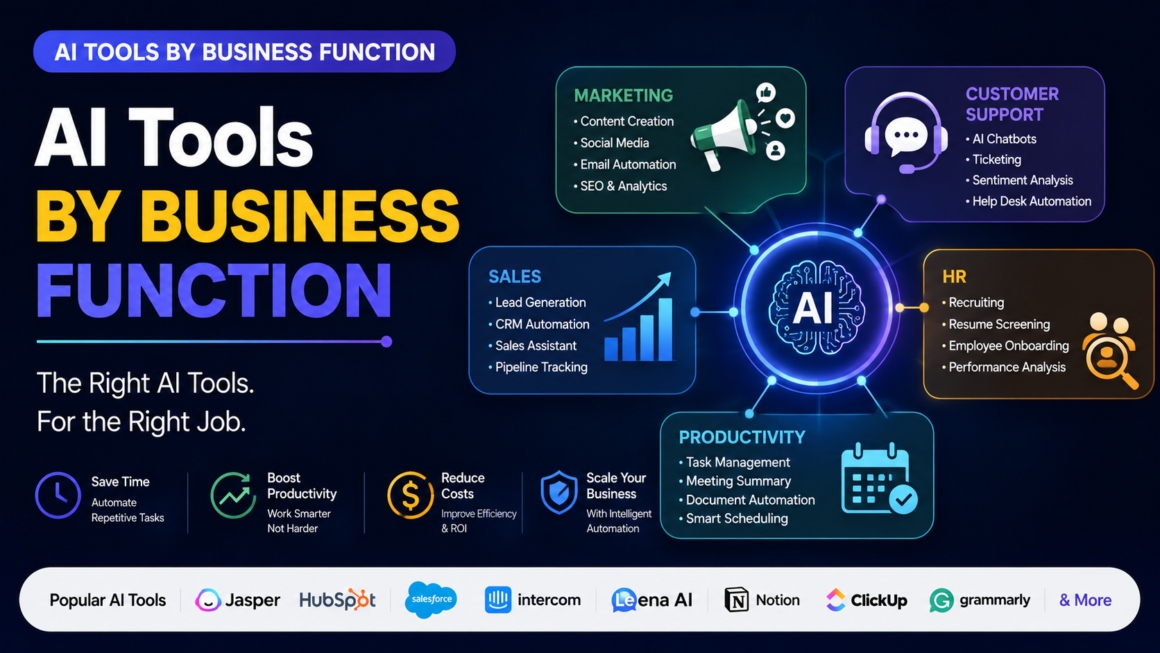
The right AI tool depends entirely on the function you’re solving for. AI marketing tools (like HubSpot AI, Jasper, and Surfer SEO) handle content, campaigns, and SEO. AI customer support tools (like Intercom Fin and Zendesk AI) automate first-response and ticket routing. AI sales tools (like Gong and Apollo.io) handle prospecting and call analysis. AI HR tools (like Workday AI and HireVue) streamline hiring and performance reviews. AI productivity tools (like Notion AI and Microsoft Copilot) speed up writing, scheduling, and internal documentation. No single tool covers every function well; successful teams pick a best-in-class tool per department, then connect them through integrations.
Overview: Why “One AI Tool Fits All” Doesn’t Work
Every department solves a different problem, so the AI built for it is trained, priced, and designed differently. A tool built to summarize sales calls has no business writing performance reviews, and a content generator built for blog posts is a poor fit for HR compliance questions.
Generic “best AI tools” roundups underperform for real buyers because they mix categories and rank by popularity, not function-fit. When deciding on AI tools by business function, the better question isn’t “what’s the best AI tool overall”; it’s “what’s the best tool for the specific bottleneck my team has right now.”
Departments that get the most value from AI in 2026 share one pattern: they map the tool to a repeatable, high-volume task first (drafting emails, tagging tickets, screening resumes), then expand from there.
AI Marketing Tools
AI marketing tools help teams produce content, personalize campaigns, and analyze performance faster than manual workflows allow.
What they do well:
- Generate first-draft blog posts, ad copy, and social captions
- Analyze SEO gaps and suggest on-page improvements
- Personalize email sequences based on user behavior
- Predict campaign performance using historical data
Where they fall short: AI-generated marketing copy still needs a human editor for brand voice, factual accuracy, and emotional nuance. Teams that publish AI drafts without review see engagement drop and, in some cases, get flagged by Google’s helpful content systems for low-value content.
Real use case: A DTC e-commerce brand uses Surfer SEO to identify content gaps, drafts outlines in Jasper, then has a human copywriter finalize the piece. This cuts content production time by roughly 40% without sacrificing quality because the AI handles research and structure, not final judgment calls.
AI Sales Tools
AI sales tools focus on prospecting, call analysis, and pipeline forecasting.
Core capabilities:
- Automatically enrich lead data with firmographic and intent signals
- Transcribe and analyze sales calls for coaching insights
- Score leads based on likelihood to close
- Draft personalized outreach at scale
Limitation to know: AI lead scoring is only as good as the CRM data feeding it. If your CRM has inconsistent or outdated fields, the AI’s predictions will be inaccurate; garbage in, garbage out still applies in 2026.
When to use them: Sales teams with more than 50 monthly leads and a defined sales process benefit most. Solo founders with a handful of high-touch deals often get more value from a simple CRM than a full AI sales stack.
AI Customer Support Tools
AI customer support tools automate first-response, ticket routing, and knowledge-base search.
How they help:
- Resolve common, repetitive questions instantly (order status, password resets, return policies)
- Route complex tickets to the right human agent automatically
- Summarize long support threads for faster agent handoffs
- Flag frustrated or high-risk customers based on sentiment analysis
Common misconception: Many buyers assume AI support tools “replace” human agents. In practice, the best-performing setups use AI to handle the 60–70% of repetitive tickets, freeing human agents for complex, high-emotion, or high-value conversations. Full automation without human escalation paths consistently produces worse customer satisfaction scores.
Real scenario: A SaaS company deployed Intercom Fin for tier-1 support. Resolution time for simple tickets dropped from 4 hours to under 2 minutes, but the company kept a human review layer for billing disputes and cancellations where AI mishandling directly risks revenue loss.
AI HR Tools
AI HR tools support recruiting, onboarding, and performance management.
Where AI adds real value:
- Screening resumes against role requirements at scale
- Scheduling interviews automatically across time zones
- Drafting job descriptions optimized for inclusive language
- Summarizing employee feedback trends across teams
A serious limitation: AI resume screening tools have documented bias risks when trained on historical hiring data that reflects past discrimination patterns. HR and legal teams should audit these tools regularly and never let AI make final hiring decisions unsupervised; this is both an ethical and, in several jurisdictions, a legal requirement.
Best practice: Use AI HR tools to shortlist and organize, not to make the final call. Human reviewers should always see the full candidate pool, not just the AI-filtered subset.
AI Productivity Tools
AI productivity tools are the broadest category; they assist with writing, scheduling, meeting notes, and internal knowledge management across every department.
Typical use cases:
- Drafting internal memos, meeting summaries, and project updates
- Searching across internal documents and wikis using natural language
- Automating repetitive scheduling and calendar coordination
- Turning voice notes or meeting recordings into action items
Practical consideration: Productivity tools like Notion AI or Microsoft Copilot deliver the fastest ROI because nearly every employee touches writing and scheduling daily. However, teams that adopt these tools without updating internal workflows often see minimal gains; the tool works, but no one changed their process to actually use the time saved.
How These Tools Actually Work
Most business AI tools today are built on large language models (LLMs) layered with function-specific training data and integrations. In simple terms:
- The tool connects to your existing data (CRM, helpdesk, HR system, or documents).
- An AI model processes that data alongside your prompt or trigger.
- The tool generates a draft, prediction, or automated action.
- A human ideally reviews or approves the output before it goes live.
The quality of any AI tool by business function depends heavily on step 1: the data it has access to. A support AI with a thin knowledge base will guess. A sales AI with messy CRM fields will misprioritize leads. Data quality is the real differentiator between AI tools that work and ones that disappoint.
Step-by-Step: Choosing Tools by Function
- Identify the highest-volume repetitive task in the department (not the most complex one).
- List your current data sources the AI tool would need to connect to.
- Shortlist 2–3 tools built specifically for that function, not general-purpose AI.
- Run a 30-day pilot with one team before company-wide rollout.
- Measure a single metric: response time, close rate, or time-to-hire before and after.
- Decide on human review points where AI output must be checked before it reaches a customer, candidate, or lead.
- Scale only what proves ROI, and cut tools that don’t move the metric.
This process works whether you’re evaluating one tool or building a full stack, and it mirrors the process outlined in How to Choose the Best AI Tools for Small Businesses in 2026.
Comparison Table
| Business Function | Example Tools | Primary Job | Typical Starting Price | Best For |
| Marketing | Jasper, Surfer SEO, HubSpot AI | Content, SEO, campaigns | $29–$99/mo | Content and demand gen teams |
| Sales | Gong, Apollo.io, HubSpot Sales AI | Prospecting, call analysis | $49–$150/user/mo | B2B sales teams with defined pipelines |
| Customer Support | Intercom Fin, Zendesk AI | First-response automation | $39–$99/agent/mo | High-ticket-volume support teams |
| HR | Workday AI, HireVue | Screening, scheduling | Custom/Enterprise pricing | Companies hiring at volume |
| Productivity | Notion AI, Microsoft Copilot | Writing, search, scheduling | $10–$30/user/mo | Every department, company-wide |
For a broader look at tools that span multiple functions, see Best AI Tools for Small Businesses 2026 Comparison.
Pros and Cons by Function
Marketing AI Tools
- Pros: Faster content production, SEO gap analysis, scalable personalization
- Cons: Requires human editing, risk of generic or repetitive output
Sales AI Tools
- Pros: Better lead prioritization, automated call insights, time saved on manual data entry
- Cons: Accuracy depends on CRM data quality; can over-automate outreach and hurt response rates
Customer Support AI Tools
- Pros: Instant resolution for repetitive tickets, 24/7 availability, sentiment flagging
- Cons: Poor handling of emotionally sensitive or high-stakes conversations without human backup
HR AI Tools
- Pros: Faster screening, more consistent job descriptions, reduced administrative load
- Cons: Bias risk in screening algorithms, legal exposure if used without human oversight
Productivity AI Tools
- Pros: Broad applicability, fast adoption, low learning curve
- Cons: Gains disappear if workflows aren’t redesigned around the time saved
Pricing Patterns
Most AI tools by business function follow a tiered SaaS model: a free or low-cost starter tier, a mid-tier per-user or per-agent plan, and custom enterprise pricing for larger teams. Support and HR tools tend to price per agent or per hire processed, while productivity and marketing tools usually price per user seat.
Budget-conscious teams should weigh the free vs paid AI tools for small businesses decision carefully: free tiers are usually sufficient for testing fit, but production use, especially anything customer-facing, typically requires a paid plan for reliability, support, and data security guarantees.
Best Use Cases
- Marketing: Scaling content production without proportionally scaling headcount
- Sales: Prioritizing which leads a rep should call first
- Support: Deflecting repetitive tickets so agents handle complex cases
- HR: Managing high-volume hiring seasons without hiring more recruiters
- Productivity: Reducing time spent on meeting notes, status updates, and internal search
Who Should Use It
Small businesses with fewer than 20 employees usually see the fastest ROI from productivity and support tools, since these affect daily operations immediately. Mid-sized companies with dedicated departments benefit most from function-specific tools like sales or marketing AI, where deeper customization pays off. Enterprises typically need HR and compliance-grade AI tools with audit trails and governance controls built in.
Alternatives Worth Testing
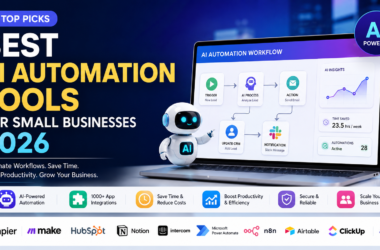
Not every business needs a specialized tool per function immediately. Some teams start with an all-in-one platform and add specialized tools as needs grow. For side-by-side options across categories, see Best AI Automation Tools for Small Businesses 2026 and Best AI Tools for Small Businesses 2026. For finance-specific needs, Best AI Tools for Small Business Accounting 2026 covers a function this guide doesn’t focus on.
Common Mistakes
- Buying an all-in-one AI suite before defining the actual bottleneck. This leads to underused features and wasted budget.
- Skipping the human review layer on customer-facing or hiring-related AI output.
- Ignoring data quality: AI tools amplify existing data problems instead of fixing them.
- Rolling out company-wide before running a small pilot.
- Measuring adoption instead of outcomes. Usage numbers don’t matter if the metric that matter—resolution time, close rate, and time-to-hire—haven’t improved.
Expert Tips
- Start with the department that has the most repetitive, high-volume task—not the most “exciting” use case.
- Keep a human in the loop for anything touching customers, candidates, or legal compliance.
- Re-audit AI HR tools quarterly for bias, especially after vendor model updates.
- Judge an AI marketing tool by editing time saved after two months, not by its first draft.
- Treat integrations as a requirement. A tool that doesn’t connect to your CRM or helpdesk creates more manual work, not less.
FAQs
What are AI tools by business function?
AI tools by business function are software solutions built for a specific department’s core tasks—such as marketing content generation, sales call analysis, customer support automation, HR screening, or general productivity—rather than general-purpose AI assistants.
Which AI tools are best for small businesses on a budget?
Productivity tools like Notion AI and support tools like Zendesk AI’s entry tiers offer the fastest ROI for small teams, since they require minimal setup and address daily operational friction immediately.
Do AI sales tools replace sales reps?
No. AI sales tools handle research, data enrichment, and call analysis, but closing deals still requires human relationship-building, especially for complex or high-value B2B sales.
Are AI HR tools legal to use for hiring decisions?
Regulations vary by jurisdiction, and several regions now require human oversight and bias audits for AI used in hiring. Companies should consult legal counsel before relying on AI HR tools for final hiring decisions.
How do I choose between free and paid AI tools?
Free tiers work well for testing whether a tool fits your workflow. For customer-facing or data-sensitive use, paid plans are usually necessary for reliability, support, and security compliance. See the free vs paid AI tools for small businesses comparison for a deeper breakdown.
What’s the difference between AI marketing tools and AI productivity tools?
AI marketing tools focus specifically on content, campaigns, and SEO output. AI productivity tools are broader, covering writing, scheduling, and internal search across every department, not just marketing.
Final Verdict
There’s no single “best” AI tool; only the best tool for a specific function, team size, and data setup. The teams getting real value from AI tools by business function in 2026 are the ones who match software to a clearly defined bottleneck, pilot before scaling, and keep humans reviewing anything customer- or candidate-facing.
Key Takeaways
- Match AI tools to a specific department’s bottleneck, not general hype.
- Marketing, sales, support, HR, and productivity each need purpose-built AI, not a one-size-fits-all platform.
- Data quality determines AI output quality more than the tool itself.
- Keep human review on anything customer-facing, hiring-related, or legally sensitive.
- Pilot before you scale, and measure outcomes, not adoption.
Conclusion
Choosing the right AI tools by business function comes down to discipline: define the bottleneck, test on a small scale, and expand only what proves measurable results. Whether you’re evaluating AI marketing tools, ai customer support tools, ai sales tools, ai hr tools, or ai productivity tools, the winning approach is the same: start narrow, review the output, and let results guide your next investment.
Ready to build your department-by-department AI stack? Start with one pilot this month, measure the results, and scale only what actually moves the needle for your team.