


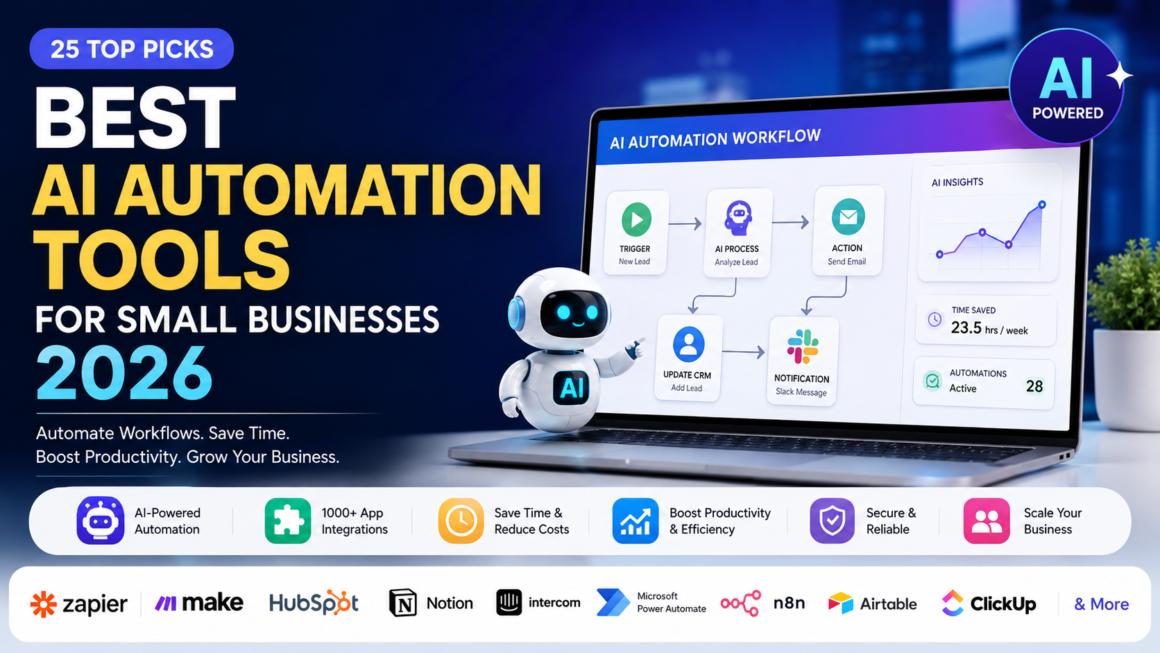
Running a small business in 2026 means doing more with fewer hands. The best AI automation tools for small businesses 2026 aren’t the ones with the longest feature list—they’re the ones that quietly remove a task from your team’s plate every single day without breaking anything else in your stack.
I’ve spent the last several years implementing automation stacks for small teams, from five-person agencies to fifty-person service businesses, and the pattern is always the same: the businesses that win with AI automation start small, measure results, and expand only when the first workflow proves itself.
This guide breaks down the tools actually worth your budget in 2026, how to choose between them, and the mistakes that turn a promising automation project into another unused subscription.
If you’re still comparing automation platforms with general-purpose AI software, our guide to Best AI Tools for Small Businesses explains which solutions are best for marketing, sales, accounting, customer support, and productivity.
Quick Answer
The best AI automation tools for small businesses in 2026 are Zapier (easiest to start, largest app library), Make (best balance of power and usability for moderate complexity), n8n (best for technical teams building AI agents affordably), HubSpot (best for sales and marketing automation in one platform), and ChatGPT Business or Claude for Small Business (best for AI-driven writing, research, and document work).
Most small businesses get the best return by combining a workflow automation platform (Zapier, Make, or n8n) with one AI assistant and one purpose-built tool for their highest-friction task, such as customer support or email marketing.
What “AI Automation” Actually Means for Small Businesses
AI automation means using software to handle tasks that used to require a person to read, decide, and act. That covers replying to a customer email, routing a support ticket, drafting a follow-up sequence, or flagging an invoice that looks off.
There are two levels worth separating, because vendors blur them constantly:
- Rule-based automation runs a fixed sequence when a trigger fires. A new form submission sends a welcome email. No judgment involved.
- AI-driven automation interprets context and makes a decision. A chatbot reads a refund request, checks the order history, and issues the refund without a human touching it.
Most tools on this list blend both. A marketing platform might use a fixed trigger to segment your list, then use an AI model to write the email copy for each segment. Understanding this distinction matters because it tells you what to trust the tool to do unsupervised, and what still needs a human checking the output.
How These Tools Were Evaluated
Every tool below was assessed against five criteria that actually predict whether a small business sticks with a platform past the trial period:
- Setup time: can a non-technical owner get a working automation live in under a day?
- Integration depth: does it connect cleanly to the apps you already use?
- AI capability: does it just move data, or can it actually make decisions and generate content?
- Cost at real usage: not the marketing price, but what a business running 5–10 active workflows actually pays.
- Failure visibility: when something breaks, does the tool tell you, or does it fail silently?
That last point gets overlooked constantly, and it’s the one that causes the most damage. A silently failed automation can mean missed leads or unanswered customers for weeks before anyone notices.
The Best AI Automation Tools for Small Businesses in 2026
1. Zapier: Best for Getting Started Fast
Zapier remains the easiest on-ramp into automation because it connects to more apps than anyone else and requires zero code. If your business runs on common SaaS tools—Gmail, Shopify, Slack, QuickBooks, and HubSpot—Zapier almost certainly has a ready-made connector.
Best for: Non-technical owners automating their first 3–10 workflows.
Limitation: Task-based pricing gets expensive fast once you’re running multi-step workflows at volume. A five-step Zap can burn five tasks per single run, so usage climbs faster than people expect.
2. Make (formerly Integromat): Best Balance of Power and Simplicity
Make sits between Zapier’s simplicity and n8n’s flexibility. Its visual canvas makes complex, branching logic easier to build and audit than Zapier’s linear format, and its operation-based pricing is generally more cost-efficient at moderate volume.
Best for: Teams that have outgrown simple triggers and need conditional logic, data transformation, or multi-branch workflows — without hiring a developer.
Limitation: The learning curve is steeper than Zapier’s, and its native AI agent tooling is newer and less mature than n8n’s.
3. n8n: Best for Technical Teams Building AI Agents
n8n has pulled ahead of both Zapier and Make specifically for AI-native automation. It supports genuine AI agent workflows: models that decide which tool to call, retain memory across steps, and pull from your own documents through retrieval-augmented generation (RAG).
Best for: Businesses with some technical capacity that want AI agents doing real decision-making, not just data-passing. Self-hosting is also a serious advantage for businesses with data residency requirements.
Limitation: Building advanced workflows requires comfort with expressions, JSON, and occasionally custom code — not ideal for a solo owner with zero technical background.
4. HubSpot: Best All-in-One for Sales and Marketing
HubSpot has evolved from a CRM into a genuine automation platform, with AI features for predictive lead scoring, content generation, and intelligent email sequencing built directly into the workflows you’re already using to manage customers.
Best for: Small businesses that want CRM, marketing automation, and AI content generation in one login instead of stitching together three separate tools.
Limitation: Costs scale quickly as you add contacts and marketing seats, and much of the deeper automation sits behind higher-tier plans.
5. ChatGPT Business / Claude for Small Business: Best for AI-Driven Work
These aren’t workflow automation platforms in the Zapier sense—they’re AI assistants that increasingly act as agents, reading and writing to tools like Google Drive, Slack, and Notion to complete multi-step cognitive tasks: drafting proposals, summarizing meetings, researching competitors, or answering internal questions from your own documents.
Best for: Knowledge-heavy tasks — writing, research, analysis, customer communication drafts — that don’t fit a rigid trigger-action model.
Limitation: Per-seat pricing adds up for larger teams, and output still needs a human review pass for anything customer-facing or factually sensitive.
6. Tidio / Intercom: Best for AI Customer Support Deflection
Purpose-built AI chat tools like Tidio and Intercom’s Fin AI resolve a meaningful share of routine customer questions instantly—order status, refund policy, and shipping timelines—without a support rep touching the ticket.
Best for: E-commerce and service businesses with repetitive support volume.
Limitation: These tools handle predictable, well-documented questions well. Nuanced or emotionally charged tickets still need a human, and routing that decision correctly requires setup time upfront.
7. Mailchimp / Notion AI: Best for Marketing and Internal Knowledge
Mailchimp’s AI features handle send-time optimization, subject line testing, and audience segmentation without a dedicated marketing hire. Notion AI turns your internal docs into a searchable, summarizable knowledge base — useful once your team is too big to remember everything in someone’s head.
Best for: Solo marketers and growing teams that need lightweight, affordable AI support layered onto tools they already use.
Limitation: Neither replaces a true automation platform—they’re additive AI features, not workflow engines.
Comparison Table
| Tool | Best For | Starting Price (Paid) | AI Agent Capability | Setup Difficulty |
| Zapier | Fast, no-code setup | ~$20–30/month | Moderate (add-on) | Easy |
| Make | Complex visual workflows | ~$9–10/month | Moderate, improving | Medium |
| n8n | Custom AI agents, self-hosting | Free self-hosted / ~$24/month cloud | High | Medium–Hard |
| HubSpot | Sales + marketing in one | Free CRM / ~$38+/month | Moderate | Easy–Medium |
| ChatGPT Business / Claude for SMB | Writing, research, agentic tasks | ~$20–25/seat/month | High | Easy |
| Tidio / Intercom | Customer support deflection | Free tier / ~$29+/month | Moderate–High | Easy |
| Mailchimp / Notion AI | Marketing & knowledge management | Free tier / ~$13+/month | Low–Moderate | Easy |
Pricing changes frequently — confirm current rates on each vendor’s site before purchasing.
How AI Automation Tools Actually Work
Every AI automation tool, regardless of vendor, follows the same basic loop:
- Trigger: something happens (a form is submitted, an email arrives, a deal stage changes).
- Processing: The tool reads the data and, if AI is involved, interprets it (classifies intent, extracts details, drafts a response).
- Action: The tool executes a step in another app (sends an email, updates a record, posts a Slack message).
- Conditional logic (optional): The workflow branches based on what happened, so different situations get different treatment.
The “AI” part typically lives in step two. That’s where large language models read unstructured text—an email, a support ticket, a document—and turn it into something a rule-based system can act on.
Step-by-Step: Building Your First Automation
Step 1: Pick one high-friction task. Don’t try to automate your whole operation at once. Choose the task that eats the most time or causes the most delay—often lead follow-up, ticket routing, or invoice reminders.
Step 2: Map the current manual process. Write down exactly what a human does today, in order. This becomes your workflow blueprint.
Step 3: Choose the right tool tier. If it’s a simple trigger-action, Zapier is enough. If it needs branching logic, use Make. If it needs judgment calls based on context, you need an AI-driven step—n8n’s AI Agent node, a ChatGPT/Claude API call, or a purpose-built tool like Tidio.
Step 4: Build with test data first. Never point a new automation at live customer data on day one. Run it against sample records and check every branch.
Step 5: Add a human checkpoint for anything customer-facing. For the first two to four weeks, route AI-generated responses through approval before they go out. This catches tone problems and factual errors before they reach a customer.
Step 6: Measure and expand. Track time saved, error rate, and customer response. Only add the next automation once the first one is stable.
Pros and Cons by Tool Category
Workflow Automation Platforms (Zapier, Make, n8n)
Pros: connect existing tools without custom development, scale from simple to complex, mature ecosystems. Cons: Pricing can spiral with volume, complex workflows need ongoing maintenance, and failures aren’t always obvious.
AI Assistants (ChatGPT Business, Claude for Small Business)
Pros: handle open-ended, judgment-heavy tasks; improve output quality with better prompts; increasingly agentic. Cons: per-seat costs add up, output still needs human review, results vary with prompt quality.
Purpose-Built AI Tools (Tidio, HubSpot, Mailchimp)
Pros: fastest time-to-value for a specific function, less configuration required. Cons: locked into that one function, less flexible if your process changes.
Pricing Snapshot
Most small businesses land in one of three budget tiers:
- Starter stack ($0–50/month): Free tiers of Zapier, Mailchimp, and Tidio, plus a single ChatGPT Plus or Claude subscription. Enough to prove out one or two automations.
- Growth stack ($100–300/month): Zapier or Make paid plan, HubSpot Starter, and a business-tier AI assistant seat for each team member who needs it.
- Scaling stack ($300+/month): n8n cloud or self-hosted, HubSpot Professional, and multiple AI seats with API-based custom automation for high-volume workflows.
Start at the bottom tier regardless of your budget. Businesses that jump straight to enterprise tooling before proving a workflow almost always underuse what they bought.
Best Use Cases by Business Type
- E-commerce: abandoned cart follow-up, AI chat for order status, review request automation.
- Professional services: proposal drafting, meeting summarization, client onboarding sequences.
- Local service businesses: appointment reminders, review requests, missed-call text-back automation.
- Agencies: client reporting automation, lead qualification, cross-platform data syncing.
- SaaS startups: onboarding email sequences, support ticket triage, usage-based lifecycle campaigns.
Who Should Use AI Automation and Who Should Wait
You’re ready if you have at least one repeatable process that happens more than 10 times a month, existing software you want to connect, and someone (even part-time) who can own the setup and monitoring.
You should wait if your processes still change weekly, you don’t yet have consistent data in your existing tools, or you don’t have anyone available to review AI output for the first month. Automating a broken or unstable process just makes the mess move faster.
Common Mistakes Small Businesses Make
- Automating before mapping the process. Skipping documentation leads to workflows that replicate bad habits instead of fixing them.
- No human checkpoint on customer-facing AI output. Even reliable models occasionally produce an off-tone or inaccurate response.
- Chasing every new AI feature. Tool-hopping wastes more time than it saves. Pick a stack and commit for at least a quarter.
- Ignoring task-based pricing math. A workflow that seems cheap in testing can multiply into hundreds of dollars a month at real volume.
- Not assigning an owner. Automations without a clear owner quietly break and stay broken.
Expert Tips for Getting ROI Faster
- Start with the task causing the most customer-facing delay, not the one that’s most interesting to automate.
- Build a simple error-alert step into every workflow—a Slack or email notification when something fails so problems surface immediately.
- Review AI-generated content weekly for the first month, then move to spot-checks.
- Keep a shared document of every active automation, what it does, and who owns it. This prevents “automation debt” as your stack grows.
- Revisit your automation stack every quarter. Tools and pricing in this space change fast, and last year’s best fit isn’t always this year’s.
Frequently Asked Questions
What is the best AI automation tool for a small business just starting out?
Zapier is generally the easiest starting point because of its no-code setup and huge app library, though Make is a close second for slightly more complex workflows.
Are AI automation tools affordable for small businesses in 2026?
Yes. Most platforms offer usable free tiers, and a functional starter stack typically costs under $50 a month before scaling up.
Can AI automation replace employees?
It replaces repetitive tasks, not judgment. Most small businesses use AI automation to free up staff time for higher-value work, not to eliminate roles outright.
What’s the difference between AI automation and basic workflow automation?
Basic automation follows fixed rules with no interpretation. AI automation adds a decision-making layer — reading context and choosing an action based on it.
How long does it take to see ROI from AI automation tools?
Most businesses see measurable time savings within two to four weeks of launching their first well-scoped workflow, provided the process was mapped correctly beforehand.
Is n8n better than Zapier for small businesses?
Not automatically. n8n offers more power and lower cost at scale, but it demands more technical comfort. Zapier is better for a first-time, non-technical setup.
Final Verdict
There’s no single winner among the best AI automation tools for small businesses in 2026—the right choice depends on your team’s technical comfort, your existing software stack, and which task is costing you the most time right now. If you want the fastest start, choose Zapier. If you want more power without hiring a developer, choose Make. If you have technical capacity and want real AI agents, choose n8n. Layer an AI assistant like ChatGPT Business or Claude for Small Business on top for writing and research, and add a purpose-built tool only once you’ve proven the core workflow works.
Key Takeaways
- The best AI automation tools for small businesses in 2026 fall into three categories: workflow platforms, AI assistants, and purpose-built tools—most businesses need at least one from each.
- Start with a single high-friction task, not a full automation overhaul.
- Zapier wins on ease of use, Make on balance, and n8n on power and cost at scale.
- Always add a human checkpoint for customer-facing AI output during the first month.
- Track cost against real usage, not advertised starting prices—task- and operation-based billing scales faster than expected.
Conclusion
Choosing among the best AI automation tools for small businesses 2026 isn’t about finding the tool with the most features—it’s about matching a platform to the specific workflow that’s costing you time today. Start small, measure honestly, and expand only once the first automation earns its place in your stack. Ready to build your first workflow? Pick the one task on your plate that repeats every single day, and automate that one first.