


Small business owners don’t need more AI tools. They need the right AI tools, chosen with a clear process instead of a hunch based on a viral LinkedIn post.
That distinction matters more in 2026 than it did even a year ago. The AI software market has gone from a handful of standout products to thousands of overlapping options, many built on the same underlying models with different branding. Picking wrong now costs more too—wasted subscriptions, half-migrated workflows, and staff who quietly stop using tools that never fit their day-to-day work.
This guide walks through exactly how to choose AI tools for a small business: what to evaluate, what to ignore, how to test before you buy, and which mistakes quietly drain budgets. It’s written for owners and operators, not developers, and it reflects patterns seen across dozens of small business tech rollouts.
Quick Answer
To choose the best AI tools for small businesses in 2026, start with a specific business problem (not a tool category), shortlist 2–3 options that integrate with your existing software, run a 14–30-day trial with real data, check data privacy and pricing scalability, and involve the actual team who will use it daily before signing an annual contract.
Why Choosing the Right AI Tool Is Harder in 2026
Three years ago, “AI tool” mostly meant a chatbot. Today it means customer service agents, accounting copilots, marketing generators, hiring screeners, inventory forecasters, and dozens of niche tools stacked on top of each other.
That growth created a real problem: feature overlap. A single small business might now have AI features baked into its CRM, its email platform, its accounting software, and a standalone chatbot, often duplicating each other without anyone noticing until the renewal invoices arrive.
This is why a documented business AI checklist matters more than chasing the newest release. The goal isn’t to have the most AI. It’s to have AI that removes real friction from a real process.
What “Best AI Tool” Actually Means for a Small Business
There is no single best AI tool; only the best-fit tool for a specific budget, team size, and workflow. A five-person bakery and a fifty-person logistics company have almost nothing in common when it comes to AI needs, even if both search the same keyword.
When evaluating and selecting AI software, judge it against three questions instead of a features list:
- Does it solve a problem my team already spends hours on?
- Can someone with no technical background use it within a week?
- Will it still make sense if my team doubles or halves next year?
If a tool fails any of these, it’s a distraction, not a solution, no matter how impressive the demo looked.
Core Features to Evaluate Before You Buy
Every serious AI buying guide should filter tools through the same non-negotiable checklist. Below are the categories that actually predict whether a tool sticks around past month three.
1. Integration With Existing Software
An AI tool that can’t connect to your CRM, POS, or accounting platform creates a second system of record, meaning double data entry and inevitable errors. Before buying, confirm native integrations with the software you already run, not just a generic “API available” claim.
2. Data Privacy and Security
Small businesses handle customer data, payment details, and sometimes health or financial records. Check where data is stored, whether it’s used to train the vendor’s models, and whether the tool is SOC 2 or GDPR compliant if you serve international customers. A vendor that’s vague about this is a red flag, not a technicality.
3. Learning Curve
If your team needs a week of training to send one email campaign, the tool has already failed. Look for tools with in-app guidance, templates, and a free trial long enough to test with real (not demo) data.
4. Scalability of Pricing
Many AI tools price attractively at low usage tiers, then jump sharply once you cross a seat or usage limit. Model your cost at double your current volume before signing, not just at today’s usage.
5. Human Override and Accuracy
AI tools still make mistakes—wrong invoice categorizations, tone-deaf customer replies, inaccurate forecasts. The best tools make it easy to review and correct AI output before it reaches a customer or your books. Tools that hide this step behind full automation are riskier for small teams with no dedicated QA person.
6. Vendor Stability
AI startups shut down or get acquired often. Check funding history, customer reviews from the past six months (not just launch-era reviews), and whether the company has a clear data export policy if you ever need to leave.
Step-by-Step Guide to Choosing AI Tools
Here is the practical process to follow when deciding how to choose ai tools for your business, in order.
- Name the problem, not the category. Write one sentence: “We spend 6 hours a week manually responding to repeat customer questions. “Don’t start with ‘We need a chatbot.”
- List your must-haves and deal-breakers. Budget ceiling, required integrations, data residency needs, and who on your team will own the tool.
- Shortlist 2–3 tools, never more. More options create decision fatigue and slow the whole process down.
- Run a real trial, not a demo. Use actual customer messages, actual invoices, or actual product data — not the vendor’s sample dataset.
- Measure time saved, not just satisfaction. Track hours before and after for two weeks. “It feels helpful” isn’t a metric; hours saved is.
- Check the exit plan. Confirm you can export your data and cancel without a lengthy contract lock-in.
- Roll out to one team first. Full-company rollouts without a pilot phase are where most AI adoption fails.
- Review after 60 days. Usage tends to drop off after the initial excitement a 60-day check tells you if the tool is actually sticking.
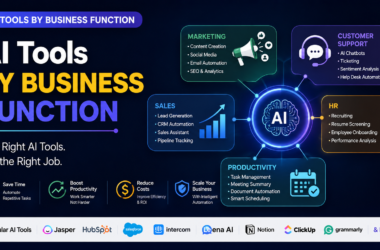
For businesses researching automation platforms specifically, this comparison of the Best AI Automation Tools for Small Businesses 2026 breaks down workflow-specific options in more depth.
Comparison Table: How AI Tool Categories Stack Up
| Category | Best For | Typical Setup Time | Learning Curve | Starting Price Range |
| AI Customer Support Agents | Businesses with repetitive support tickets | 1–2 weeks | Moderate | $20–$150/month |
| AI Accounting & Bookkeeping | Businesses managing invoices, expenses, tax prep | 1 week | Low | $15–$80/month |
| AI Marketing & Content Tools | Businesses producing regular social/email content | 1–3 days | Low | $0–$60/month |
| AI Sales & CRM Copilots | Sales teams handling high lead volume | 2–4 weeks | Moderate–High | $30–$200/month |
| AI Hiring & HR Tools | Businesses hiring frequently | 1–2 weeks | Moderate | $50–$300/month |
For a category-by-category breakdown with named products, see this detailed Best AI Tools for Small Businesses 2026 Comparison.
Pricing Models Explained
Understanding pricing structure prevents budget surprises later.
- Flat monthly subscription: predictable, but you may overpay if usage is low.
- Usage-based pricing: cheaper at low volume, riskier as you scale.
- Per-seat pricing: simple to budget but expensive as headcount grows.
- Freemium with paid tiers: good for testing, but core features are often locked behind paywalls.
A rule of thumb: if a tool’s pricing page requires a sales call to understand, budget extra time for negotiation and expect enterprise-style contract terms even at a small-business scale.
Best Use Cases by Business Type
Retail and e-commerce: Inventory forecasting and personalized product recommendations tend to show the fastest ROI.
Professional services (law, accounting, consulting): Document summarization and drafting assistants save the most billable hours, provided outputs are always human-reviewed.
Restaurants and hospitality: AI scheduling and demand forecasting reduce overstaffing and food waste more reliably than customer-facing chatbots.
Local service businesses (plumbers, salons, contractors): AI-powered appointment booking and follow-up messaging recover more revenue than any content-generation tool.
If accounting is your priority, this dedicated guide to the Best AI Tools for Small Business Accounting 2026 covers vetted options in that category specifically.
Who Should Use AI Tools and Who Should Wait
AI tools make the most sense for businesses with repetitive, high-volume tasks and at least one person willing to own the rollout. They make less sense for businesses under five employees with highly variable, judgment-heavy work, where the setup time may exceed the time saved.
If your team is already stretched thin managing current software, adding another tool without retiring an old one usually backfires. Replace, don’t just add.
Common Mistakes Small Businesses Make
- Buying based on a demo, not a trial. Demos use clean, ideal data. Your business doesn’t have clean data.
- Skipping the team who’ll actually use it. Owners often choose tools alone, then wonder why adoption is low.
- Ignoring data privacy until after signing. Read the data usage policy before, not after, uploading customer information.
- Chasing the newest tool instead of the most stable one. Being first isn’t a competitive advantage if the tool disappears in a year.
- No exit plan. Many businesses discover too late that their data can’t be easily exported.
- Automating a broken process. AI speeds up whatever process you feed it, including bad ones.
Expert Tips From Real Rollouts
- Start with the task your team complains about most; it’s usually the highest-ROI place to apply AI.
- Set a hard 30-day decision deadline; indefinite trials rarely convert to a clear yes or no.
- Assign one internal “tool owner” per system; shared ownership means no ownership.
- Re-evaluate every AI subscription every six months; usage patterns and pricing both shift quickly in this market.
- Don’t sign annual contracts in year one of using a new tool category; month-to-month costs more per month but far less if the tool doesn’t work out.
Alternatives to Buying New Software
Before adding a new subscription, check whether AI features already exist inside tools you’re paying for. Many CRMs, email platforms, and accounting tools quietly added AI features in the past year that are already included in your current plan. A short audit of existing subscriptions often uncovers capabilities you don’t need to buy separately.
Pros and Cons of Adopting AI Tools
Pros
- Reduces time spent on repetitive tasks
- Can operate outside business hours (support, scheduling)
- Often cheaper than hiring additional staff for the same task
- Improves consistency in customer communication
Cons
- Requires setup time and occasional troubleshooting
- Can produce inaccurate output without human review
- Subscription costs add up across multiple tools
- Data privacy risk if vendor vetting is skipped
FAQs
How do I know if my business is ready for AI tools?
If your team spends several hours a week on a repetitive task with clear rules, you’re ready. If your work is highly custom or judgment-based, start with a smaller pilot first.
What’s the biggest risk in selecting AI software for a small business?
Choosing based on hype rather than a documented business need. Tools bought without a clear problem to solve are the ones most likely to be abandoned within three months.
Should I choose one all-in-one AI platform or several specialized tools?
Specialized tools usually perform better individually, but an all-in-one platform reduces integration headaches. Small teams with limited technical support often do better starting with one all-in-one platform.
How much should a small business budget for AI tools in 2026?
Most small businesses spend between $100–$500 per month across all AI tools combined, scaling with team size and usage volume.
Is free AI software good enough for a small business?
Free tiers work well for testing, but usage limits and lack of support usually make paid tiers necessary once a tool becomes part of daily operations.
Final Verdict
There’s no universal “best” AI tool for small businesses in 2026 — only the best-fit tool for a specific, well-defined problem. The businesses getting real value from AI right now aren’t the ones with the most tools; they’re the ones that picked carefully, tested with real data, and were willing to walk away from tools that didn’t earn their place.
Conclusion
Learning how to choose the best AI tools for small businesses in 2026 comes down to discipline, not luck: define the problem first, test with real data, check integration and pricing scalability, and involve the people who’ll actually use the tool every day. Skip the trend-chasing, and the AI tools you choose will still be earning their subscription cost a year from now.
Ready to see named tools by category? Explore this in-depth roundup of the Best AI Tools for Small Businesses 2026 to shortlist options that match your specific workflow.
Key Takeaways
- Start with a specific business problem, not a tool category.
- Test with real data during a trial, not vendor demo data.
- Check integrations, data privacy, and pricing scalability before signing.
- Involve your team in the decision; low adoption kills more AI rollouts than bad software does.
- Re-evaluate tools every six months; this market moves fast.