



You have a back log of 200 items. There are 50 threads of feedback that are unread in your inbox. Now, in 20 minutes, you’re going to have a roadmap meeting and you still haven’t got a definite plan for what you want to develop next.
That’s the job. AI tools are not making decisions for you, they’re helping you to filter out the noise and make decisions.
The best AI tools for product managers in 2026 fall into five categories: writing and PRDs (Claude, Notion AI), research and discovery (Perplexity, NotebookLM, Dovetail), roadmapping and prioritization (Productboard, Linear), meeting intelligence (Granola), analytics (Amplitude), and rapid prototyping (Gamma). Usually it’s not all ten tools that most PMs need, it’s 3-4.
The majority of “best AI tools” lists merely pile up the logos on a page and that’s all. It’s not good for you. The things that really help are knowing what problem each tool addresses, which problem you have, and why you need it.It’s the knowledge of the problem that each tool solves, the problem you have, and why that problem needs to be solved that really helps, rather than paying for software that isn’t used after month one.
Why This Matters Right Now
Product teams are releasing products at an even more accelerated pace than ever. The stakeholders would like to be updated weekly, not quarterly. Customers want features to be introduced quickly and engineering isn’t really up to the task.
This is something that you can do manually, and you will waste hours doing things that it doesn’t really add strategic value to your work. Manually reading all the support tickets. Creating the same tweet five different ways to send to five different groups. Providing the same prioritization logic to all the stakeholders.
The chances of overlooking AI tools are not limited to a waste of time. Slow decision-making, out-of-date roadmaps, and PMs who spend more time working on spreadsheets than talking to users.
Here are some of the changes that are expected in 2026 in particular. According to a recent enterprise survey, almost all product professionals are using AI tools every day and report using them to save them nearly 4 hours per task with PRDs and competitive analysis being the significant areas of where AI is being used. If this is not a minor edge, then what is? That is the difference between sending out a feature that is well researched, and a guess.
There’s a more subtle change going on under the productivity improvements, as well. The early AI tools merely refactored current PM tasks, creating faster drafts, quicker summaries. The newer wave reaches further, allowing PMs to prototype ideas right away without having to wait for a design/draft or engineering time to become available. The second layer is beginning to be seen as their leverage.
This doesn’t imply that you are supposed to use AI for anything. That’s choosing the two or three tools that eliminate your particular roadblock, be it research, writing, or actually what is shipping.
The Core Toolkit: 10 AI Tools Worth Your Time
1. Claude (Writing, Research & Requirements)
With Claude, you can draft PRDs, summarise meetings and conduct competitive analysis all in one go. Add 10 interview transcripts and you’ll find themes in a matter of minutes instead of hours.
It also comes in handy for more troublesome tasks. Prepare an email to the stakeholder asking him/her to tone it down, then asking him/her to further narrow the ask to two sentences. It used to take that back and forth 20 minutes. Now it takes three.
Unique insight: Most PMs prefer to use Claude for one-off drafting. A larger victory is to think of it as a thinking partner. When you take your feature idea to engineering, your raw feature idea should be pasted into this and you should have holes in it. You’ll enter that meeting with answers ready to go for the objections you know you will receive.
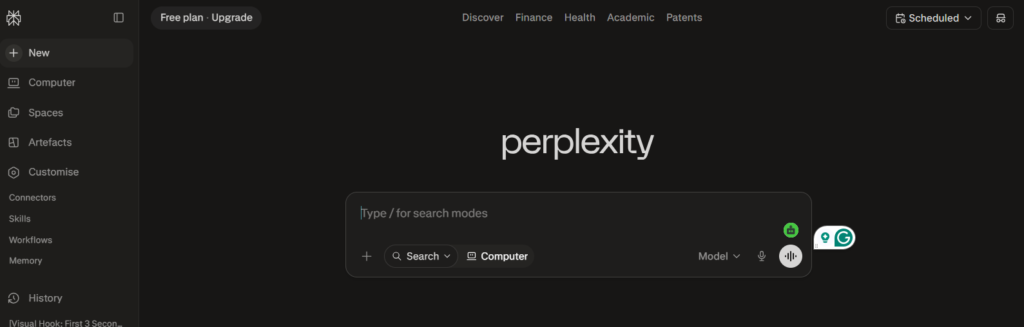
2. Perplexity (Cited Market Research)
Perplexity fetches answers from these active points and displays where they are sourced. That’s important when you’re pitching to executives that will ask “where did you get this?”.
Rather than opening 15 browser tabs to learn how your competitors do it, just ask Perplexity. It compiles the answers and provides you the sources in a single go, and validates much faster and much more defensibly, if you’re in a room of skeptics.
3. NotebookLM (Document-Grounded Q&A)
Upload your own research documents, interview notes and specs. NotebookLM is able to answer questions only based on that data, thus you have no risk of making up a statistic that it does not have in your data.
This is especially effective in case you’re bringing a new PM on board for an existing product. Put all of your old specs and tickets in NotebookLM and they can ask “why did we build it this way?” without having to sift through 6 years of Slack history. Makes tribal knowledge searchable.
4. Productboard (Feedback-to-Roadmap Pipeline)
Productboard stores feedback from support tickets, sales calls and surveys in a central location, and detects patterns and suggests what to prioritize next with the help of AI. It’s designed to be adopted by teams already overwhelmed with unstructured customer data.
However, the downside here is that AI capabilities typically come with a price tag and Productboard doesn’t actually give you a glimpse into what’s being shipped anyway. This will require an execution layer, Linear or Jira.
5. Linear (AI-Powered Execution Tracking)
Using Linear’s AI triage, incoming issues are automatically sorted, reducing manual backlog grooming. It is not a replacement for Productboard or Aha! for strategic roadmapping but is the purest way to understand what is getting shipped this sprint.
If you’re a smaller team, Linear can serve as a simple roadmap method, so you can maybe wait until you truly need a roadmap solution.
6. Dovetail (User Research Synthesis)
Dovetail tags and clusters themes in dozens of interview recordings. Don’t have to watch all of calls again before strategy meeting, pull up a synthesized theme board in minutes.
It’s particularly important for teams with continuous discovery that have new interviews every week, because manually re-tagging old interviews is not feasible.
7. Granola (AI Meeting Notes)
Granola quietly joins into your calls and transforms them into ‘notes’ that are organized by a bot without anyone knowing. This can save nearly an hour per day for PMs who have to work in back-to-back meetings with stakeholders.
It’s not the stand-out feature—it’s the transcription. It’s the repeating of questions and worries only to realize there are other people who are having the same issues after the fifth person.
8. Amplitude (Product Analytics in Plain English)
Request Amplitude’s AI layer to display a graph of retention rate for a particular cohort, or mark retention where users drop off, and it creates the chart without writing any SQL. Quickest way to test a gut feeling before investing engineering effort.
Edge case: This is to be used before, not after a scoping meeting. Now take the pull the retention curve for a segment you think is churning and you’ll be in the discussion with data, not a theory.
9. ChatPRD (Requirements Documentation)
ChatPRD is created specifically for writing Product Requirements. It poses the correct clarifying questions before creating a draft, reducing the amount of back-and-forth with engineering on unclear specs.
It also exports easily into Notion or Slack, so the requirements doc doesn’t end up being another document that nobody reads again.
10. Gamma (Stakeholder Decks in Minutes)
Simply place a rough-draft draft and Gamma takes care of layout and design. Transforms an unpresentable PRD outline into an actual, presentable stakeholder deck without picking up another slide template.
This is the best tool to use the night before a leadership review when you’ve got the material but no time remaining to format the document.
Where to get more learning: New AI tools for product workflows are rolling out monthly, but it’s impractical for everyone to test each piece of software themselves. ByteBenz monitors and evaluates AI tools such as these as they develop to make sure you understand what’s really worth implementing before you begin your next quarter.
How to Build Your Stack Without Overpaying
Please do not purchase 10 tools in one week. This is how teams get to have products that sit on shelves that no one accesses after a couple of months.
First, you need to determine your #1 time suck. Writing: If you’re writing, begin with Claude or ChatPRD. If searching for information, use Perplexity or Dovetail. If it’s tracking the execution, then Linear does that alone.
A second tool is only added when it actually becomes part of your routine, not when it’s a bookmark you’ve added that you forget about. The number of tools most PMs end up with is: Writing, Research/Feedback, Roadmapping/Execution, Analytics.
Here the size of the team is more important than the features. If you are doing it with two people, then enterprise-grade feedback aggregation isn’t necessary. Most likely a 40-person product org that runs on-going discovery does.
Quick Comparison: Which Tool Fits Which Job
| Tool | Best For | Free Tier? | Ideal Team Size |
|---|---|---|---|
| Claude | Writing, PRDs, research synthesis | Yes | Any |
| Perplexity | Cited market & competitive research | Yes | Any |
| NotebookLM | Q&A over your own documents | Yes | Any |
| Productboard | Feedback aggregation & roadmapping | Limited | Mid-size to enterprise |
| Linear | Execution tracking & AI triage | Yes | Startup to mid-size |
| Dovetail | Interview & research synthesis | Limited | Research-heavy teams |
| Granola | AI meeting notes | Yes | Any |
| Amplitude | Behavioral product analytics | Limited | Mid-size to enterprise |
| ChatPRD | Structured requirements docs | Limited | Any |
| Gamma | Fast stakeholder presentations | Yes | Any |
Frequently Asked Questions
What’s the best AI tool for product managers just starting out?
Use Claude to get writing and research started. It includes PRDs, summaries, and analysis in one spot prior to adding the specialized tools.
Can AI replace user research for product managers?
No. AI can speed up synthesis and pattern spotting, but the reality of conducting real research will still involve real conversations with real users. While any gaps caused by synthetic data can be filled, primary research cannot be replaced by synthetic data.
How many AI tools does a PM actually need?
The majority of PMs find only 3-4 tools useful: writing, research, roadmapping and analytics. A greater number of them typically results in an overlap and not additional value.
Are these AI tools worth it for small teams?
Yes, if your first choice is free tiers. So before spending any money, you can try out Claude, Perplexity, NotebookLM, Linear and Gamma—all of which have free plans you can use without any hassle.
Do these tools integrate with what my team already uses?
Most do. Claude and ChatPRD can export into Notion and Slack, Linear can connect to Slack and GitHub, and Amplitude can integrate with most common analytics pipelines. If you have a workflow in place, review integrations prior to purchase.
Build Your AI-Powered PM Stack Today
You don’t have to use all 10 tools. You require the appropriate three or four to where your workflow really gets stuck.
This week begin using one writing and one research tool. Once these two are in your routine add on roadmapping and analytics.
Want the latest AI tool breakdowns before your competitors find them? Explore more AI tool guides on ByteBenz →