10 Best Free AI Tools for College Students in 2026 (Tested & Useful)
Finding the best free AI tools for college students can help improve productivity, simplify research, and make studying easier in 2026. Students face constant pressure. Assignments pile up. Notes get messy. Research takes forever. Presentations need polish. Time management feels impossible.
AI tools solve these problems. They save hours every week. They improve grades. They make learning faster. The best free AI tools for college students work well without costing money. This guide tests 10 powerful tools. Each one helps with specific study tasks. You will find tools for writing, research, note-taking, and more.
Why Students Are Using AI Tools in 2026
Students embrace AI in 2026 for real reasons. Learning happens faster with AI help. Productivity improves dramatically. Note summaries appear instantly. Writing gets polished automatically. Research becomes targeted and efficient.
Presentations create themselves in minutes. Language skills grow through personalized practice. Time management becomes manageable. The best free AI tools for college students handle repetitive tasks. This frees students for deep thinking and creative work.
AI does not replace learning. It supports learning. Students use AI to study smarter, not harder. The right tools make a huge difference.
10 Best Free AI Tools for Students in 2026
1. OpenAI ChatGPT
Best for writing, brainstorming, and study support
ChatGPT helps with homework across all subjects. You ask questions and get clear answers. Research assistance comes fast. Essay ideas appear when you are stuck. Coding help explains complex concepts simply. Study planning becomes organized with AI guidance.
The free version includes powerful features. You get regular access without payment. Students use it daily for assignments and reviewing material. ChatGPT remains one of the best AI apps for university students.
2. Google Gemini
Best for Google ecosystem integration and real-time research
Gemini connects seamlessly with Google tools. Research support feels natural. Summaries appear quickly from long documents. Real-time information stays current. Free student use cases include email drafting, document summarization, and web research.
Gemini works well for students already using Google Workspace. The integration saves time. You search, summarize, and create without switching apps. This makes Gemini among the free AI tools for studying and homework.
3. Notion AI
Best for AI note-taking and study planning
Notion AI transforms note-taking. Lecture organization becomes automatic. Task management stays on track. Study planning follows smart templates. AI summarizes meetings and lectures instantly.
The free plan includes basic AI features. Students organize entire semesters in one workspace. Notes link together logically. This makes Notion AI one of the AI tools for note taking every student should try.
4. Grammarly
Best for grammar correction and academic writing
Grammarly catches grammar mistakes instantly. Essay improvement happens sentence by sentence. Academic writing support includes citation suggestions. Tone checking ensures your writing sounds professional.
The free version handles basic corrections well. Students submit cleaner assignments. Writing quality improves noticeably. Grammarly remains a top choice among AI writing tools for students for good reason.
5. Canva AI
Best for presentation design and visual content
Canva AI creates stunning presentations fast. Resume creation takes minutes. Study infographics explain complex topics visually. AI image generation produces custom graphics.
The free plan includes hundreds of templates. Students design professional slides without design skills. This makes Canva AI among the best AI apps for students who need visuals.
6. QuillBot
Best for paraphrasing and summarization
QuillBot rewrites sentences clearly. Summarization condenses long articles quickly. Citation help formats references correctly. Academic writing improves with better word choices.
The free version offers multiple paraphrasing modes. Students avoid plagiarism while keeping meaning intact. QuillBot is one of the free AI homework tools for rewriting and editing.
7. Otter.ai
Best for lecture transcription and voice notes
Otter.ai transcribes lectures automatically. Voice-to-text notes save typing time. Meeting summaries highlight key points. Study organization becomes easier with searchable transcripts.
The free plan includes 300 monthly transcription minutes. Students record lectures and review them later. This makes Otter.ai among the top AI tools for note taking.
8. Perplexity AI
Best for AI-powered research with source citations
Perplexity AI gathers information fast. Source-based answers include links. Research paper support finds credible sources quickly. Information gathering happens in seconds.
The free version provides unlimited searches. Students verify facts with citations. Perplexity AI ranks among the best AI research tools for students for accuracy.
9. Duolingo Max
Best for AI language learning and speaking practice
Duolingo Max uses AI for personalized lessons. Speaking practice includes real-time feedback. Language learning adapts to your level. Student benefits include role-playing conversations.
The free version offers core language courses. Max features include some AI explanations. Duolingo remains one of the free AI learning platforms for college students for language mastery.
10. Gamma
Best for AI presentations and project slides
Gamma creates presentations from prompts. Quick project slides appear in minutes. Student project design feels effortless. Free templates cover every subject.
The free plan includes unlimited generations. Students build professional decks without design experience. Gamma is among the best free educational AI tools for visual projects.
10 Best Free AI Tools for Students in 2026 – Comparison Table
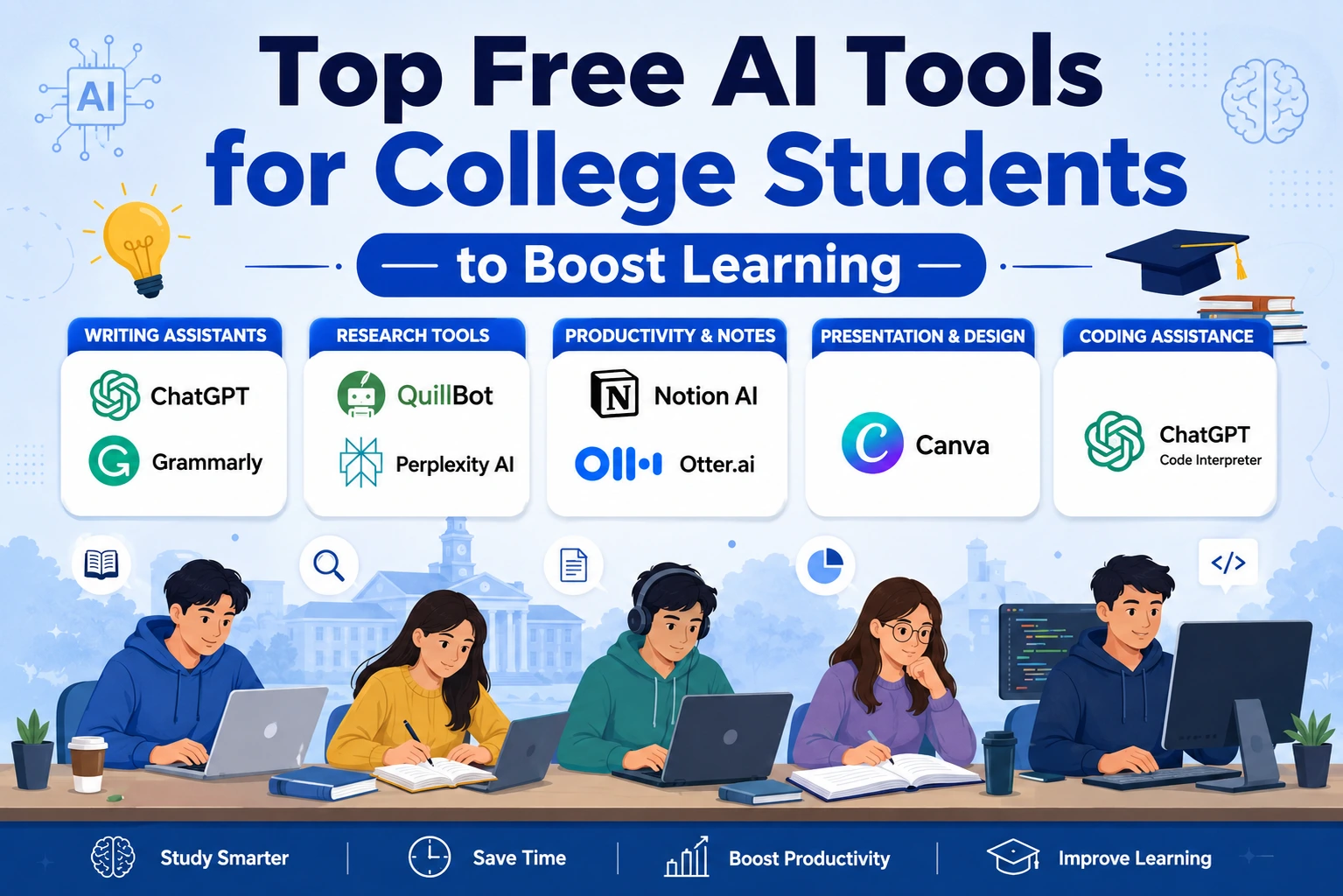
| # | AI Tool | Best For | Free Plan Features | Key Benefit |
| 1 | OpenAI ChatGPT | Writing, brainstorming, study support | Unlimited chats, homework help, essay ideas, coding support | All-in-one study assistant |
| 2 | Google Gemini | Google ecosystem, real-time research | Gmail/docs integration, summaries, web search | Best for Google users |
| 3 | Notion AI | Note-taking, task management, study planning | AI summaries, lecture organization, templates | Centralized study workspace |
| 4 | Grammarly | Grammar correction, academic writing | Real-time grammar checks, tone suggestions, plagiarism scan | Polished writing every time |
| 5 | Canva AI | Presentation design, resumes, infographics | 250K+ templates, AI image generation, drag-and-drop | Professional visuals fast |
| 6 | QuillBot | Paraphrasing, summarization, citations | 125-word paraphrase limit, 3 summary modes, citation tool | Avoid plagiarism easily |
| 7 | Otter.ai | Lecture transcription, voice-to-text notes | 300 min/month transcription, searchable transcripts | Never miss lecture points |
| 8 | Perplexity AI | AI-powered research with source citations | Unlimited searches, source links, fact-based answers | Accurate research with citations |
| 9 | Duolingo Max | AI language learning, speaking practice | Core courses free, AI role-play, personalized lessons | Master any language fast |
| 10 | Gamma | AI presentations, project slides | Unlimited generations, 500+ templates, export to PDF | Slides in minutes, not hours |
How to Choose the Right AI Tool for Your Studies
Pick tools based on your specific needs. Writing needs point to Grammarly or ChatGPT. Research needs suggest Perplexity AI or Gemini. Productivity goals match Notion AI or Otter.ai.
Presentation requirements mean Canva AI or Gamma. Free plan limitations matter. Check feature caps before committing. Ease of use saves setup time.
Test tools for one week. See which ones fit your workflow. The best free AI tools for college students vary by major and study style.
Benefits of Using Free AI Tools for College Students
Students save study time consistently. Grades improve with better writing and research. Organization becomes automatic with AI planners. Research happens faster with targeted searches.
Presentations create themselves in minutes. Writing quality rises with grammar and style checks. The best AI study tools for college students deliver measurable results. Students graduate sooner with less stress.
Are Free AI Tools Safe for Students?
Data privacy matters. Check privacy policies before signing up. Academic honesty requires transparency. Tell professors when you use AI.
Avoid plagiarism by rewriting AI content. Fact-check AI outputs always. AI makes mistakes sometimes. Responsible AI usage means using tools as assistants, not replacements.
The best free AI tools for college students include privacy protections. Still, never share personal information unnecessarily.
Common Mistakes Students Make While Using AI
Copy-pasting AI content gets you caught. Professors recognize AI writing patterns. Not checking facts leads to wrong answers. AI hallucinates sometimes.
Overdependence on AI kills critical thinking. You still need to learn material. Ignoring plagiarism risks causes academic trouble. Paraphrase everything.
Using too many tools together creates confusion. Stick to 3–5 tools maximum. The best AI apps for university students work best when used intentionally.
Future of AI Tools in Education
Personalized learning becomes the norm. AI tutors help one-on-one. Smart classrooms adapt to student pace. AI-generated study plans optimize learning schedules.
Voice learning assistants respond to questions instantly. The best free AI tools for college students will only improve. Education transforms through AI integration. Students who adapt now will lead tomorrow.
People Also Ask (FAQ Section)
What is the best free AI tool for students?
ChatGPT is the best free AI tool for students overall. It handles writing, research, brainstorming, and study planning.
Which AI tool is best for homework help?
ChatGPT and Gemini provide the best homework help. They answer questions across all subjects.
Are AI tools free for college students?
Yes. Many free AI tools for students exist. ChatGPT, Gemini, Grammarly, Canva, and QuillBot offer free plans.
Can students use AI tools for assignments?
Yes, but use them responsibly. AI assists learning. It should not replace your own work.
What AI tool helps with note-taking?
Otter.ai and Notion AI are top AI tools for note taking. They transcribe and organize lectures.
Which AI tool is best for presentations?
Canva AI and Gamma create the best AI presentations. They design slides quickly.
Is ChatGPT good for students?
Yes. ChatGPT is among the best AI study tools for college students. It helps with writing, research, and coding.
What are the best AI research tools for students?
Perplexity AI and Gemini are the best AI research tools for students. They find sources with citations.
Can AI improve student productivity?
Yes. AI productivity tools for students save hours weekly. They automate repetitive tasks.
Are AI tools allowed in schools and colleges?
Most schools allow AI with guidelines. Check your institution’s policy first. Use AI transparently.
Conclusion
AI tools help students save time and study smarter. The best free AI tools for college students in 2026 handle writing, research, note-taking, and presentations. Test multiple tools to find your perfect fit.
Use AI responsibly. Fact-check everything. Avoid plagiarism. Rewrite AI content in your own voice. The right tools improve grades while reducing stress.
For more technology guides, AI tool reviews, and digital trends, explore ByteBenz. Start using the best free AI tools for college students today. Your future self will thank you.
👉 Related Guide: What Is Artificial Intelligence & How Does It Work In 2026?
👉 Related Guide: Challenges of Artificial Intelligence: Key Problems & Practical Solutions 2026
👉 For more technology insights and AI transformation strategies, explore expert content on ByteBenz.